Subsections of email trends
email AUTHENTICATION guidelines

!! ATTENTION !! This document has been automatically translated from Italian
Guidelines
Configuration of email service for authentication
The Italian National Cybersecurity Agency has published the Guidelines for configuring the email service for authentication, with the objective of strengthening the reliability of the email service for all interested organizations and increasing its overall level of security.
Version Control
| VERSION |
PUBLICATION DATE |
NOTES |
| 1.0 |
April 2026 |
First publication. |
INDEX
1. Introduction
1.1. Premise
Email represents today one of the most critical services in the digital context as it is among the main channels used by organizations and users for communications and information exchange.
The functioning of the email service and in particular the transmission of messages is based on the SMTP protocol which, however, does not natively incorporate adequate mechanisms for sender authentication and protection of the confidentiality and integrity of messages. These vulnerabilities expose it to the risk of attacks such as spoofing, phishing, tampering and message interception during transit.
To mitigate the weaknesses of the SMTP protocol and therefore reduce the risk due to the aforementioned attacks, mechanisms for sender authentication and protection of message integrity have been developed over time, such as SPF (Sender Policy Framework), DKIM (DomainKeys Identified Mail) and DMARC (Domain-based Message Authentication, Reporting and Conformance).
These guidelines illustrate these mechanisms with the objective of strengthening the reliability of the email service and increasing its overall level of security, with particular reference to the threats described in Chapter 4.
The countermeasures and protocols necessary to protect the confidentiality of email messages (such as S/MIME and OpenPGP which concern message encryption) are not the subject of these guidelines.
1.2. Reference Regulations
| REGULATION |
DESCRIPTION |
| National Cyber Security Perimeter (PSNC) |
Decree-Law 21 September 2019, no. 105. Urgent provisions regarding the national cyber security perimeter and discipline of special powers in sectors of strategic importance. |
| Cloud Regulation for Public Administration |
ACN Directorial Decree no. 21007/24 of 27 June 2024. |
| Legislative Decree 4 September 2024, no. 138 |
Legislative Decree 4 September 2024, no. 138. Transposition of Directive (EU) 2022/2555, concerning measures for a high common level of cybersecurity across the Union, amending Regulation (EU) No 910/2014 and Directive (EU) 2018/1972 and repealing Directive (EU) 2016/1148. |
1.3. Reference Documents
» back to top
2. Regulatory Context
To protect the digital assets of the country, including email services and the infrastructures hosting them, a broad body of security measures derived from current legislation is in place and subject to constant updating.
The highest level of protection for the country’s most critical services, connected to the protection of national security, is ensured by the National Cyber Security Perimeter, established by Decree-Law 21 September 2019, no. 105, converted with amendments by Law 18 November 2019, no. 133. This provides security measures with particularly high levels of protection, detailed in Annex B of the Prime Minister Decree 14 April 2021, no. 81, which apply to the networks, information systems, and IT services of public and private entities upon which the exercise of an essential function of the State or the provision of an essential service for the maintenance of civil, social or economic activities fundamental to the State’s interests depends, the compromise of which could result in prejudice to national security.
Furthermore, email services, like all digital services of public administration, are subject to the provisions of the so-called Cloud Regulation, adopted pursuant to Article 33-septies of Decree-Law 18 October 2012, no. 179 and updated by the National Cybersecurity Agency (ACN) with Directorial Decree no. 21007 of 27 June 2024. Under the aforementioned Regulation, all public administrations are called upon to classify their digital data and services as ordinary, critical or strategic, according to the model prepared by ACN. This activity is aimed at ensuring that public administration digital data and services are processed and delivered through digital infrastructures and cloud services that meet requirements, including security ones, appropriate to the risks associated with the relative classification level, as detailed by the Regulation.
Legislative Decree 4 September 2024, no. 138 (the so-called NIS decree) transposing Directive (EU) 2022/2555 also established – through Annexes 1 and 2 of ACN determination 379907/2025 – the basic security measures that essential and important entities adopt for the purposes of the obligations under Articles 23 and 24 of the NIS decree, defining a security framework to strengthen the protection of network and information systems, including email services.
» back to top
3. Email Service Architecture
As noted in the premise, the functioning of the email service is based on the SMTP protocol which regulates the transmission of email messages from the sender to the recipient.
The SMTP protocol was originally defined in 1982 as a store-and-forward protocol, in which the sender generates a message through their mail client, in jargon Mail User Agent (MUA), which sends it to the sender’s mail server. This, through a component called Mail Transfer Agent (MTA), forwards the message, possibly also through one or more intermediate MTAs, delivering it to the destination mail server’s MTA. The recipient user accesses the message through their mail client (MUA)[1].
The MTA is therefore a component of the email service that handles the transmission of email messages from the sender to the recipient. MTA components are present on the sender’s and recipient’s mail servers, and intermediate MTAs can also be configured, for example, to manage distribution lists.
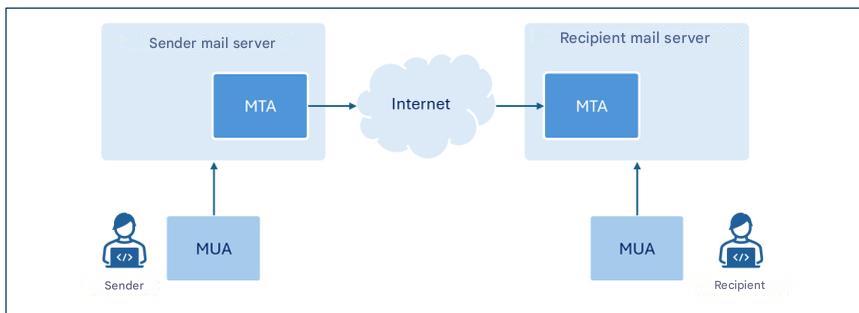
Figure 1. High-level architecture of the email service.
The figure represents only the components of interest for these guidelines.
Although the term MTA identifies a specific component of email servers, since for the purposes of this document reference is made to the latter mainly in their function as MTAs, where there is no ambiguity, for simplicity of exposition the term email server will often be used instead of the more specific MTA.
In this guideline we focus on the configuration of the SPF, DKIM and DMARC protocols to allow mail servers to verify the authenticity and integrity of email messages.
» back to top
4. Threats
The SMTP protocol introduced in the previous chapter was initially designed to operate in a relatively small academic network and did not take into account aspects relating to the security of transmitted messages or sender authentication [1].
The growing spread of email and the intrinsic weaknesses of the SMTP protocol have favored, over time, the emergence of attacks whose main types are briefly illustrated in the following paragraphs.
4.1. Sender Spoofing
Spoofing is a cyber attack technique used to forge the sender’s address of a message and make the latter appear to come from a reliable address (such as, for example, that of a colleague, an acquaintance, or one’s own banking institution), inducing the recipient to perform potentially dangerous actions, such as, for example, opening an email attachment or clicking on links contained in the message.
This type of attack is relatively simple to carry out, as the SMTP protocol does not include sender authentication mechanisms and, therefore, through the email client it is possible to configure any sender address when originating the message.
Sender email address: envelope-from and message-from
The email message format provides for two distinct fields to indicate the sender’s email address. These fields are named envelope-from and message-from: the first (also referred to as return-path because it specifies the email address to which any error messages generated when an email does not reach the recipient must be sent) is the address used to correctly route the message, the second is the address displayed by the recipient in the received message header.
Drawing an analogy with sending a letter within an envelope via traditional mail, the envelope-from represents the sender’s address shown on the letter’s envelope, while the message-from corresponds to the heading present in the letter that indicates who wrote to the letter’s recipient.
It is important to note that the two addresses may not coincide. This distinction allows managing situations such as, for example, forwarding messages from third-party services, distribution via mailing lists, or automatic email replies.
It is indeed possible to indicate any sender both at the message-from level (sender’s email address displayed by the recipient in the received message header) and envelope-from level (sender’s email address used for message transmission).
To counter these threats, it is therefore essential to provide mechanisms that allow reliably authenticating the sender and verifying that the person who sent the message is actually authorized to do so.
4.2. Phishing
Phishing is a cyber attack technique aimed at the fraudulent acquisition of information (such as, for example, login credentials, credit card numbers, or other sensitive data), generally by sending deceptive messages that simulate origin from reliable senders.
Spoofing, examined in the previous paragraph, is among the main techniques adopted by an attacker to forge the sender’s identity and make the message appear to come from a legitimate user or domain.
Alternatively, a sender address/domain similar to one recognizable by the recipient can be used, altering, for example, the so-called display name in order to strengthen the apparent authenticity of the message.
To send phishing messages, legitimate accounts previously compromised by the attacker can also be used.
A phishing message typically has content constructed to generate urgency, alarm, or economic interest in the recipient, creating situations that induce them to react impulsively and perform specific actions such as opening malicious attachments or clicking on links that redirect to apparently legitimate websites, but which in reality have been created by the attacker with the goal of stealing information and/or installing malware.
Usually, phishing attacks are conducted by transmitting the same email message to a large number of victims, without adapting the text to the specific profile of the victims.
A variant of phishing is so-called spear phishing, in which the attacker knows and specifically targets the victim’s profile.
Unlike a generic phishing email, a spear phishing message uses more precise contextual information to convince the user that they are interacting with a reliable sender [2].
4.3. Message Tampering
The content of an email message, like any other communication traveling over the Internet network that does not make use of end-to-end encryption (E2EE) techniques, can be intercepted and modified during transit between sender and recipient (a type of threat commonly called man-in-the-middle).
Consequently, in addition to the loss of confidentiality, the received message might not correspond to the one originally composed by the sender.
An attacker could, for example, manipulate the message content to make it appear to come from a reliable sender, modify the text or any links and/or attachments present in the message or insert malicious code.
The recipient, trusting the apparent authenticity of the message, can thus be induced to perform potentially harmful actions, such as communicating login credentials, authorizing payments, or opening malicious files.
To counter these threats it is therefore essential to adopt mechanisms that guarantee the integrity and authenticity of the message, ensuring that the received content has not been modified and that the sender is really who they claim to be.
» back to top
5. Countermeasures
Chapter 2 recalled the regulations that provide for security measures also for the protection of email services. This document is intended primarily to provide a guide to the implementation of the security measures, provided for by these regulations and reported in Appendix A, which are also relevant for the configuration of email services, in order to mitigate the risks associated with the threats discussed in Chapter 4. It should be noted nonetheless that the indications contained in these guidelines are also recommended to those subjects who are not subject to the aforementioned regulations.
The security measures in question do not explicitly refer to the configuration of the email service but – depending on the regulation considered – to the configuration of IT systems and industrial control systems (PSNC and Cloud Regulation) or information and network systems (NIS2). The email services, subject of these guidelines, fall into both types of systems.
In particular, the SPF, DKIM, DMARC protocols are illustrated below, which provide security mechanisms designed with the aim of strengthening the overall security of the email service and in particular of sender authentication and message integrity control.
5.1. SPF
SPF – Sender Policy Framework is an authentication protocol, formalized by RFC 7208, that allows a domain owner to specify which IP addresses are authorized to send email messages on its behalf and to establish the policies that the recipient must apply if the IP address associated with the domain of the sender’s email address is not among those explicitly authorized.
The authorized IP addresses are listed in a DNS TXT record relating to the sender domain called SPF record and illustrated in the subsequent section of this paragraph.
In this way, the recipient’s email server when receiving a message from a given domain can query the related SPF record and authenticate its origin by verifying that the IP address from which the message was received falls among those authorized to send messages on behalf of the domain.
It is important to observe that the domain being verified at the SPF level is the one relating to the envelope-from, consequently the adoption of the SPF protocol alone is not sufficient to counter spoofing as this type of attack could be carried out at the message-from level.
In the event that an organization outsources, in whole or in part, its email service to a third party, such as, for example, a cloud provider, it must ensure that the messages sent by such providers pass SPF checks. To this end, the organization should include in its SPF record the IP addresses from which the providers send emails on behalf of the organization’s domain.
In the case of automatic email forwarding, since messages are typically redirected by an intermediate server, the IP address making the final delivery no longer coincides with the one originally authorized by the sender domain. In these cases, in order not to cause the SPF verification to fail, it is necessary to authorize also any intermediate forwarding servers, or resort to mechanisms such as SRS (Sender Rewriting Scheme) or ARC (Authenticated Received Chain) which can be more effective, especially in the presence of numerous intermediate forwarding servers.
It should be highlighted that for SPF to be truly effective, it must be correctly configured not only by the sender, but also by the recipient. In particular:
- the sender must publish the SPF record in the relative DNS server declaring the addresses that are authorized to send emails on its behalf;
- the recipient must configure its own mail server so that it executes SPF verification on received messages and coherently applies the resulting policies.
5.1.1. SPF Record
An SPF Record is a DNS record of TXT type whose name corresponds to the sender domain and whose content is constituted by the section indicating the version and a series of directives that indicate the behavior of the recipient’s mail server when there is a match between the IP address of the sender domain and a directive.
The directives are formed by a mechanism preceded by a qualifier. The main mechanisms used in SPF records are [2]:
- ip4, lists authorized IPv4 addresses;
- ip6, lists authorized IPv6 addresses;
- a, authorizes IP addresses present in the domain’s A record;
- mx, authorizes IP addresses relating to the domain’s MX records;
- include, authorizes IPs present in the SPF record of another domain;
- all, represents all IP addresses that have not been explicitly authorized through the other mechanisms.
In particular, the all mechanism allows establishing policies for messages coming from IP addresses that have not been declared by previous mechanisms.
Furthermore, SPF provides the following qualifiers to associate with mechanisms:
- + (pass) indicates that IP addresses matching the associated mechanism are authorized. It is the default qualifier if another is not specified;
- - (fail) indicates that IP addresses matching the associated mechanism are not authorized;
- ~ (softfail) indicates that IP addresses matching the associated mechanism are probably not authorized. This is a more uncertain declaration than the previous one. In these cases the message should be accepted but marked for more in-depth analysis, it is used for example in debugging cases or when it is foreseen that SPF verification might not be successful;
- ? (neutral) indicates that no indication is given for IP addresses matching the associated mechanism. The default behavior is to accept the message.
It is good to highlight that in practice, the SPF record is composed to specify authorized IP addresses, then resorting to the directive -all to specify that all other addresses are not authorized (in this regard, please refer to the examples below). This represents the recommended configuration as it allows explicitly indicating authorized IP addresses and excluding all others.
In any case, it is recommended to never use the directive +all (or the equivalent all) as it would correspond to the authorization of all IP addresses.
Examples of SPF records
Authorize a specific IP address
v=spf1 ip4:203.0.113.0 -all
The SPF record shown above uses SPF version 1 and authorizes through the ip4 mechanism the IP address 203.0.113.0 (in fact, as no qualifier is specified for the ip4 mechanism, the default + is implicitly used). The -all directive formed by the all mechanism and the - (fail) qualifier specifies that all other addresses are not authorized.
Authorize a specific IP address space
v=spf1 ip4:203.0.113.0/24 -all
The SPF record shown above is analogous to the previous one, but authorizes all IP addresses of the 203.0.113.0/24 address space.
Authorize multiple IP addresses
v=spf1 ip4:203.0.113.22 ip4:203.0.113.44 -all
The SPF record shown above authorizes exclusively the IPv4 addresses 203.0.113.22 and 203.0.113.44.
Authorize MX record addresses and a specific domain
v=spf1 mx include:spf.emailprovider.it -all
The SPF record shown above authorizes exclusively the IP addresses of the MX records of the same domain as the SPF record and those authorized of the domain spf.emailprovider.it (for example, the domain of an email service provider).
5.1.2. Authentication Process
If correctly configured to perform SPF verification, the recipient’s mail server upon receiving a new email message retrieves the sender domain’s SPF record by querying the DNS server that contains the records of such domain as it results from the address reported in the envelope-from field. For example, if the address reported in the envelope-from field is alice@example.com, the recipient’s mail server retrieves the SPF record of the domain example.com.
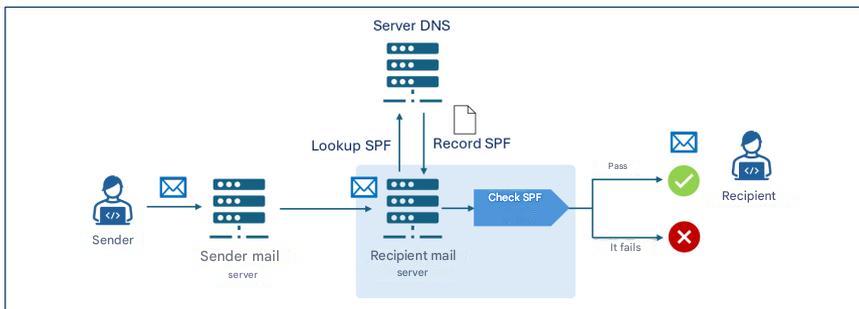
Figure 2. Working mechanism of SPF verification.
The recipient’s mail server then performs the SPF verification, analyzing the SPF record to determine if the IP address from which it received the message is authorized to send emails for the example.com domain. In case the email message passes the SPF verification it is delivered to the recipient.
For example, if the SPF record of the example.com domain were v=spf1 ip4:203.0.113.22 -all the verification would pass only if the sender server’s IP address were 203.0.113.22, while it would fail for any other address.
» back to top
5.2. DKIM
DKIM – DomainKeys Identified Mail is an authentication protocol, formalized by RFC 6376, that allows a domain owner to guarantee the authenticity of email messages sent by affixing a digital signature (DKIM signature) generated by the mail server via public cryptography algorithms and inserted in the headers of the message to be transmitted.
To allow the recipient to verify that the message has not been modified during transmission, the public key associated with the DKIM signature is preserved in a TXT record of the sender domain’s public DNS, called DKIM record, which is queried by the recipient mail server upon message reception.
The DKIM signature and record are illustrated in the subsequent sections of this paragraph.
As with SPF, DKIM must also be correctly configured by the sender and recipient and in particular:
- the sender must configure its mail server to generate DKIM signatures and publish the DKIM record in the relative DNS server;
- the recipient must configure its mail server so that it performs DKIM verification on received messages.
5.2.1. DKIM Signature
The DKIM signature is generated starting from designated elements of the message body and headers and consists of a series of key-value pairs that specify elements among which:
- v: protocol version;
- a: encryption algorithm used;
- d: signing domain declaring message authenticity;
- s: selector indicating which DKIM public key to look for in the DNS record;
- h: list of email headers included in the signature;
- bh: hash of the message body encoded in base64 format;
- b: actual digital signature generated with the private key and encoded in base64 format;
- x: signature validity date;
- c: type of canonicalization.
Canonicalization is the process of normalizing message elements before being digitally signed in order to reduce the impact of small modifications that can occur during transit, such as repeated spaces or line breaks. There are two types of canonicalization: simple, which requires an exact match between the original message and the received one, and relaxed, which applies normalizations like space removal, conversion of uppercase letters to lowercase in headers, and reduction of consecutive empty lines in the message body.
5.2.2. DKIM Record
The DKIM record is preserved in a TXT type DNS record whose name has the structure selector._domainkey.domain, where _domainkey is a label used to indicate that the DNS record is indeed a DKIM record. The content of the DKIM record consists of a series of key-value pairs specifying elements among which:
- v: protocol version;
- k: key type, which by default is RSA;
- p: public key encoded in base64 format.
Example of DKIM record
Name: s1._domainkey.example.com
Value: v=DKIM1; k=rsa; p=Y2hpYXZ1cHViYmxpY2FkaWVzZW1waW8h...
The example DKIM record is associated with the selector s1 of the example.com domain, uses version 1 and contains the RSA public key encoded in base64 format (Y2hpYXZ1cHViYmxpY2FkaWVzZW1waW8h...).
5.2.3. Authentication Process
If the DKIM protocol is correctly configured on both the sender’s and recipient’s mail servers, the functioning of the DKIM authentication and verification process provides that the sender mail server creates the DKIM signature of the message as described in paragraph 5.2.1, which is added to the message itself. In particular, the DKIM signature contains in the d field the signing domain and in the b field the digital signature of the message generated with the private key of the signing domain.
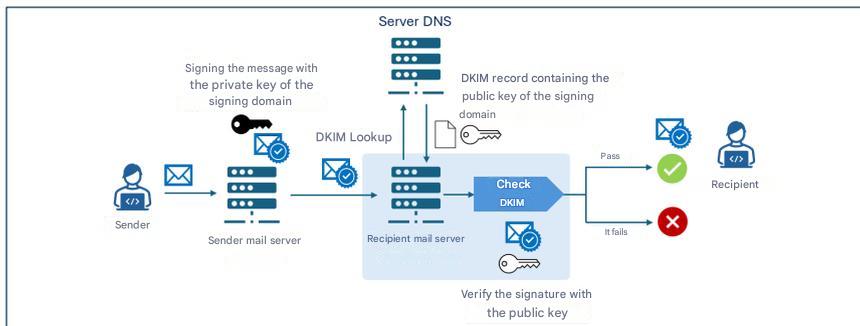
Figure 3. Working mechanism of DKIM verification.
Upon receiving a message, the recipient mail server retrieves the DKIM record of the signing domain (d field of the DKIM signature) from the DNS server containing the records of that domain. Then it uses the public key contained in the DKIM record to verify the digital signature (b field) contained in the DKIM signature. If the verification is successful, the message is delivered to the recipient.
5.2.4. Cryptographic Aspects
On the cryptographic front, DKIM has historically used the RSA algorithm, particularly in the rsa-sha256 variant, considered the standard since 2007. The new alternative, introduced by RFC 8463, is Ed25519-SHA256, a modern form of digital signature based on elliptic curves that guarantees greater efficiency and much more compact keys.
On a technical level, RSA, with a key length of 2048 bits, remains the universal standard, but the keys are long and signatures relatively large, while Ed25519 offers keys nine times shorter and signatures four times smaller, with signing performance up to thirty times superior compared to RSA 2048. Despite these advantages, real-world support is limited: in 2026 Ed25519 is verified only by a few providers, while some major operators do not reliably support either signing or verification, making it unsuitable as the sole solution in production.
For this reason, despite being technically superior, at the time of writing this document, the use of Ed25519 is not recommended except in combination with RSA, via dual signature, from an experimental perspective and as a future compatibility measure. Until major providers fully implement its verification, RSA remains essential to guarantee maximum message delivery assurance.
Regarding long-term security, it is important to remember that neither RSA nor Ed25519 are resistant to attacks by future quantum computers [3], and the transition towards post-quantum algorithms will require new DKIM standards that do not currently exist, making it essential to monitor next-generation cryptography developments and future ACN recommendations in this area.
Regarding cryptographic key management aspects, the DKIM private key must be protected with rigorous security measures, keeping it on isolated systems accessible only to authorized services, adopting restrictive permissions, periodic rotation, and constant monitoring to prevent unauthorized access or compromises.
» back to top
5.3. DMARC
DMARC – Domain-based Message Authentication, Reporting and Conformance is an authentication protocol, formalized by RFC 7489, that integrates the SPF and DKIM mechanisms allowing a domain owner to specify, to recipients of messages transmitted from that domain, the policies for managing those messages that fail SPF and DKIM verifications.
In particular, DMARC introduces an authentication mechanism – called alignment – that verifies the correspondence between the domains authenticated by SPF and DKIM and the domain relating to the message-from field of the received message. Note that the alignment check between the message-from field and the SPF/DKIM domain fails in any case if the corresponding SPF/DKIM verification fails (see Figure 4).
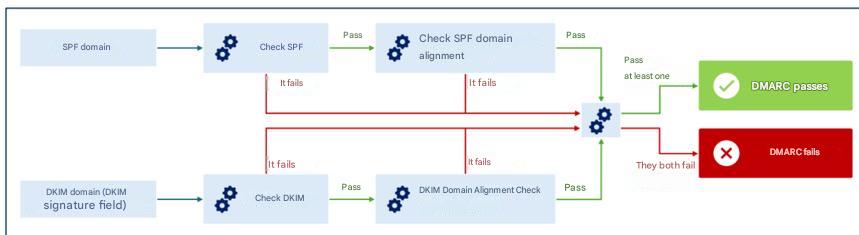
Figure 4. DMARC verification mechanism.
Alignment can be verified in strict mode, where an exact match is required between the domains authenticated by SPF/DKIM and the one relating to the message-from field, or relaxed, where it is sufficient that the primary domains match, even if subdomains might be different.
For example, in relaxed mode for domains sub1.example.com and sub2.example.com an alignment would be found for DMARC verification purposes (since the primary domain, example.com, is the same). In strict mode, however, the DMARC alignment check would fail due to the lack of an exact match between domains.
Through alignment verification, even if an attacker managed to pass SPF and/or DKIM checks using a message-from different from the envelope-from authenticated by SPF and/or from the authenticated signing domain, DMARC would still detect the discrepancy, ensuring coherent and reliable verification of the sender’s identity [2].
The policies for managing messages that fail DMARC verification are specified in a TXT record of the sender domain’s relative DNS server called DMARC record and illustrated in the subsequent section of this paragraph.
DMARC also allows indicating to recipients to send reports, to the sender domain owners, regarding messages claiming to originate from that domain. In this way, the domain owner can verify if their domain is being used in an unauthorized manner and to what extent, analyzing, for example, how many messages are actually traceable to them out of the total messages claiming its origin.
As with SPF and DKIM, DMARC must also be correctly configured by the sender and recipient and in particular:
- the sender must publish the DMARC record in their DNS specifying the policies with which to manage messages failing DMARC verification;
- the recipient must configure their mail server to execute DMARC verification on received messages.
5.3.1. DMARC Record
The DMARC record name has the structure _dmarc.domain, where _dmarc is a label used to indicate that the DNS Record is a DMARC record and domain is the domain to which the policy refers.
The DMARC record consists of a series of key-value pairs specifying elements among which:
- v: DMARC protocol version;
- p: policy to apply to messages failing DMARC verification, can assume one of the values
none, quarantine, reject;
- aspf: alignment mode to apply to SPF check (can be
relaxed, default value, or strict);
- adkim: alignment mode to apply to DKIM check (can be
relaxed, default value, or strict);
- rua: email addresses to which to send aggregate reports with statistical and summary information on messages received from the sender domain;
- ruf: email addresses to which to send detailed reports on individual messages received from the sender domain that failed DMARC verification.
Example of DMARC record
Name:
_dmarc.example.com
Value:
v=DMARC1; p=reject; rua=mailto:dmarc-reports@example.com; ruf=mailto:dmarc-fail@example.com; adkim=s; aspf=s
The example DMARC record is associated with the example.com domain, uses version 1 and specifies the reject policy for messages failing DMARC verification, requesting strict mode (s) for verification of alignment of SPF and DKIM domains and to transmit aggregate reports to the email address dmarc-reports@example.com and failure reports to the address dmarc-fail@example.com.
5.3.2. DMARC Policies
As described in the previous paragraph, the DMARC record indicates the policy that the recipient mail server should apply for messages that do not pass DMARC verification. The possible policies are the following:
- none: the sender domain gives no indications regarding the delivery of messages failing DMARC verification;
- quarantine: the sender domain indicates that messages failing DMARC verification should be considered suspicious (e.g., subjected to further scrutiny, treated as spam or labeled as suspicious);
- reject: the sender domain indicates that messages failing DMARC verification should be rejected.
5.3.3. Policy Verification and Application Process
If the DMARC protocol is correctly configured on both the sender’s and recipient’s mail servers, upon message reception the recipient mail server retrieves the SPF and DKIM records to perform the related verifications, as well as the DMARC one (detailed in the incipit of paragraph 5.2.4). In the event the message does not pass DMARC verification, the policy indicated in the DMARC record (none, quarantine or reject) is applied.
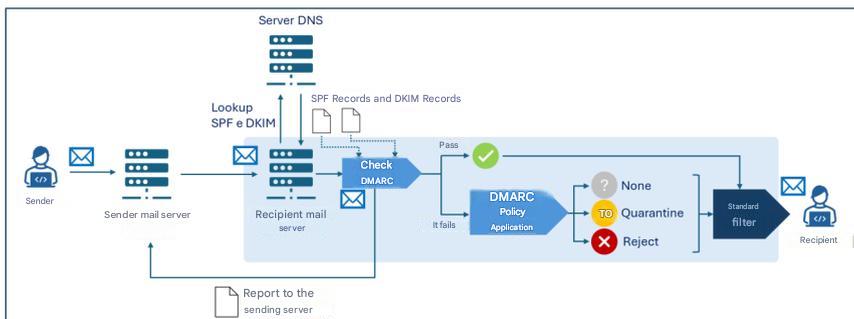
Figure 5. Verification and application process of DMARC policies.
Note that each mail server can adopt local heuristics and policies to determine the delivery or not of a message, also taking into account the outcome of SPF, DKIM and DMARC verifications. Therefore, generally, there is an additional decision-making process (“Standard filter” in Figure 5) downstream of the aforementioned verifications, which may also include further checks (like, for example, anti-spam and anti-malware filters).
Furthermore, the recipient mail server can transmit:
- to the addresses indicated in the
rua field of the DMARC record, aggregate reports with statistical and summary information on messages received from the sender domain;
- to the addresses indicated in the
ruf field of the DMARC record, detailed reports on individual messages received from the sender domain that failed DMARC verification.
» back to top
6. Conclusions
As discussed in the previous chapter, in order to best counter threats linked to sender domain impersonation it is necessary that all three examined protocols are implemented jointly and, in particular, that [3]:
- the sender domain correctly publishes SPF, DKIM and DMARC records in DNS;
- the sender’s mail server is configured to sign messages with DKIM;
- the recipient’s mail server is configured to perform SPF and DKIM verifications and apply DMARC policies.
With reference to protocol implementation, the following recommendations are also formulated [2]:
- configure SPF specifying which IP addresses are authorized to send emails on behalf of the domain; for domains not used for email transmission, for example those intended exclusively for websites, an SPF record should still be created to explicitly indicate that there are no valid email senders for that domain;
- use state-of-the-art encryption protocols and algorithms considered secure for DKIM keys, at the date of writing this document 2048-bit RSA is recommended;
- adequately protect the DKIM private key stored on the mail server, adopting restrictive access permissions, and ensure that only the mail server software has read privileges to the key;
- configure each mail server with a unique key pair and selector, in order to reduce the impact of a potential private key compromise;
- protect the private key from both accidental disclosure and attempts at access or modification by an attacker;
- provide that software relating to any mailing lists verifies DKIM signatures on incoming messages and affixes new DKIM signatures on outgoing ones;
- use unique DKIM key pairs for each third party sending emails on behalf of the organization;
- periodically rotate DKIM key pairs (at least every six months) to mitigate the impact of a potential compromise;
- immediately revoke keys in case of suspected compromise;
- monitor DMARC reports to identify any configuration errors or abuse attempts.
For further details, refer to the resources listed in Reference Documents.
It is observed that, to adequately protect email security, in addition to the authentication protocols examined here, there are further protocols – not the subject of these guidelines – such as, for example, TLS – Transport Layer Security which guarantees transmission channel encryption and SMIME and OpenPGP which concern end-to-end encryption and message authentication.
It is also noted that – while not an email security protocol in the strict sense – for the purposes of email service security it is recommended to implement DNSSEC (Domain Name System Security Extensions), a DNS protocol extension that adds cryptographic signatures to DNS records in order to guarantee the integrity and authenticity of DNS queries. Thanks to DNSSEC, for example, information relating to SPF, DKIM and DMARC records is protected during transmission, reducing the risk of alteration and therefore increasing email service security.
» back to top
Appendix A: Security Measures
National Cyber Security Perimeter (PSNC)
PR.IP-1: Reference practices (so-called baselines) are defined and managed for the configuration of IT systems and industrial control systems that incorporate security principles (e.g., principle of least functionality).
- There is a detailed updated document indicating, also in relation to category ID.AM, at least:
- a) the security policies adopted for developing configurations of IT and industrial control systems and the deployment of only the adopted configurations;
- b) the list of IT and industrial control system configurations employed and the reference to relative reference practices;
- c) the processes, methodologies and technologies employed that contribute to compliance with security policies.
Cloud Regulation – Digital Infrastructures and Services for Public Administration
PR.IP-01: Reference practices (so-called baselines) are defined and managed for the configuration of IT systems and industrial control systems that incorporate security principles (e.g., principle of least functionality).
- Policies and procedures are defined with reference to application security to provide adequate support for planning, realizing and maintaining application security features, which must be reviewed and updated at least annually.
- There is a detailed updated document indicating, also in relation to category ID.AM, at least:
- a) the security policies adopted for developing configurations of IT and industrial control systems and the deployment of only the adopted configurations;
- b) the list of IT and industrial control system configurations employed and the reference to relative reference practices;
- c) the processes, methodologies and technologies employed that contribute to compliance with security policies.
- Basic requirements for the security of various applications are defined and documented.
- Metrics, of a technical nature, useful for monitoring the level of adherence to defined security requirements and compliance obligations are defined and implemented.
- There is a process for application vulnerability mitigation and recovery for application security, automating remediation when possible.
- There is a process for validating device compatibility with operating systems and applications.
- There is a variation management system in terms of operating system, patching and/or applications.
Cloud Regulation – Cloud Services for Public Administration
PR.IP-01: Reference practices (so-called baselines) are defined and managed for the configuration of IT systems and industrial control systems that incorporate security principles (e.g., principle of least functionality).
- Policies and procedures are defined with reference to application security to provide adequate support for planning, realizing and maintaining application security features, which must be reviewed and updated at least annually [IaaS, SaaS].
- There is a detailed updated document indicating, also in relation to category ID.AM, at least:
- a) the security policies adopted for developing configurations of IT and industrial control systems and the deployment of only the adopted configurations;
- b) the list of IT and industrial control system configurations employed and the reference to relative reference practices;
- c) the processes, methodologies and technologies employed that contribute to compliance with security policies [SaaS].
- Basic requirements for the security of various applications are defined and documented.
- Metrics, of a technical nature, useful for monitoring the level of adherence to defined security requirements and compliance obligations are defined and implemented.
5.There is a process for application vulnerability mitigation and recovery for application security, automating remediation when possible.
- There is a process for validating device compatibility with operating systems and applications [PaaS, SaaS].
- There is a variation management system in terms of operating system, patching and/or applications [PaaS, SaaS].
NIS 2
PR.PS-01: Configuration management practices are established and applied.
- For at least relevant information and network systems, their secure baseline configurations (hardened) are defined and documented in an updated list.
- In compliance with the policies referred to in measure GV.PO-01, procedures are adopted and documented in relation to point 1.
» back to top
Bibliography
[1] NIST, «Technical Note 1945».
[2] NIST, «NIST Special Publication 800-177 Revision 1»
[3] National Cybersecurity Agency, «Post-quantum and quantum cryptography - Preparation for the quantum threat».
[4] National Cybersecurity Agency, «Email authentication framework».
» back to top
a good alternative to BCC EMAILS

In a previous post we explained the pros and cons of using bcc emails,
see: “how to send and limit BCC EMAILS”.
In the conclusions, among the other sentences, we stated:
Use dedicated apps to send mass mailings.
The professional systems have an approval workflow
and step by step control,
they are designed to avoid mistakes.
Summary of this article:
How it works
Email marketing platforms can be hard to learn and to support (in case you provide them to your customers).
What we are describing here is the idea to use the open source software “GNU Mailman” to send your mass mailings.
The suggestion comes from our own experience offering the easy to use “copymail app”.
A Mailman “one-way” list is a configuration for newsletters or announcements
where only authorized moderators can post, and members cannot reply to the list.
Here’s how it works:
-
The user sends the message from their email client or from the webmail to the list’s email address.
He must then approve the delivery, which will be distributed server-side to all subscribers.
-
The system automatically handles bounces (returned emails) and, if desired, unsubscribes.
Subscriptions must be registered manually.
-
The service is highly reliable, capable of handling thousands of addresses without difficulty.
Sending relies on RealSender’s or other SMTP servers.
back to top
GNU Mailman “one-way” list
GNU Mailman is a widely used software that most Internet Service Providers offer.
On the interenet there are a few guides that explain how to configure and use it for mass mailings:
- members join by filling in a form on your website (and replying to the confirmation email)
- they will be sent a welcome message that does not mention how to post to the list
- they will receive your newsletters, with a footer that gives simple instructions for unsubscribing
- only authorized persons can post to the list (send the newsletters)
The main reference is this document taken from two posts by Barry Warsaw to the mailman-users list:
How do I create a newsletter/announcement/one-way list?
The text explains in detail the main points:
- how to create a customized welcome message and listinfo page that avoids mentioning how to post to the list
- how to minimize password issues and unsubscription problems commonly faced on this type of list
- how to restrict the list so only authorized persons can post
- how to set an announcement list to reply to a contact address
- how to post to the announcement list
Another article from Stanford University explains how Mailman
can be used to set up a list to be ‘announcement-only’:
How to set up a ‘one-way’ announcement-only or newsletter list - Knowledge article KB00010792
back to top
Some history about GNU Mailman
Mailing lists can be discussion-based or announcement-based. Mailman software is written in Python language, before its release the Python community used Majordomo, a Perl-based mailing list manager.
Today, Mark Sapiro is maintaining the stable 2.1 branch,
while Barry Warsaw, concentrates on the new 3.X version.
Two overriding principles that are critical to Mailman’s ongoing success:
- No message should ever be lost
- No message should ever be delivered more than once
In Mailman 2 the developers re-designed the message handling system to ensure that these two principles would always be of prime importance. This part of the system has been stable for at least a decade now, and is one of the key reasons that Mailman is as ubiquitous as it is today.
back to top
VERP bounce management
VERP stands for Variable Envelope Return Path.
It is a well-known technique that mailing lists use to unambiguously determine bouncing recipient addresses.
When the mailing list gets the bounce, it can do something useful, such as disable the bouncing address or remove it from the list’s membership.
There is a standard format for the bounces, called delivery status notifications. Mailman uses a library that contains dozens of bounce format heuristics, all of which have been seen in the wild during the twenty years of Mailman’s existence.
VERP exploits a requirement of the fundamental SMTP protocol to provide unambiguous bounce detection, by returning such bounce messages to the envelope sender.
This is not the From: field in the message body, but in fact the MAIL FROM value set during the SMTP dialog. This is preserved along the delivery route, and the ultimate receiving mail server is required, by the standards, to send the bounces to this address.
If the Mailman server is mylist@example.org, then the VERP-encoded envelope sender for a mailing list posting sent to anne@example.com will be:
mylist-bounce+anne=example.com@example.org. Bounced emails are sent to the VERP-encoded recipient address. Mailman can then parse the To: header to decode the original recipient as anne@example.com
Using VERP requires that Mailman send out exactly one copy of the message per recipient.
VERP requires a unique MAIL FROM for each recipient, and the only way to do that is to send a unique copy of the message.
This approach also helps prevent the message from being identified as spam.
back to top
From and Mail From address alignment
During the trial period, the default “copymail app” configuration uses a domain provided by us as the Mail From address (also known as the bounce/return-path/envelope address), which is the address to which bounced emails are returned. This Mail From domain is different from the From address domain (the sender address visible to recipients).
Before putting it into production, some changes must be made to the DNS, to authenticate the messages sent with the From domain.
The latest email standards allow you to send authenticated emails using a subdomain as the Mail From address (for example, email.youremaildomain.com) while still being able to use the base domain as the From/Sender address (for example, info@youremaildomain.com). Further details can be found within the email authentication advanced page.
The same situation may occur in other environments. We recommend verifying this with your internet service provider.
back to top
reverse PROXY for SMTP servers
A reverse proxy is a server that sits in front of one or more web servers
to handle client requests, improving security, performance, and scalability.
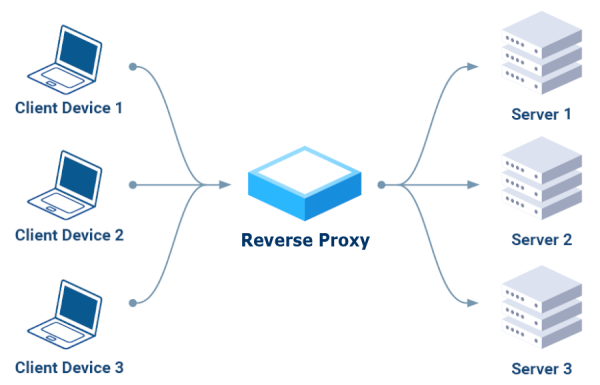
Instead of communicating directly with servers,
clients send their requests to the reverse proxy,
which routes them to the appropriate servers
acting as a single, secure access point.
Key Benefits:
- Security
It can block malicious requests, encrypt traffic,
and protect backend servers from direct attacks.
- Performance
It distributes incoming traffic across multiple servers, preventing overload
of a single server and ensuring greater availability.
- Scalability
It allows you to add or remove backend servers without service interruption,
offering the ability to handle growing traffic.
HTTP-only reverse proxy (Layer 7)
There are several tools available on the internet; after research, we initially ruled out those that only support the HTTP protocol (Layer 7):
NO Apache
“Oh dear. Take a moment to learn about the technologies you’re dealing with. Email uses SMTP.
Apache uses HTTP. Apache knows absolutely nothing about SMTP. If you want to work with email messages, you’ll need a technology that speaks SMTP.”
– EEAA Commented Aug 18, 2016 at 2:49
NO Caddy
“Caddy cannot proxy TCP, only HTTP over TCP.
Use a reverse proxy that can proxy TCP like Traefik, Nginx, or haproxy, or use this experimental plugin.”
– ElevenNotes Commented Sep 24, 2024
We then focused on the three recommended in the comments:
“Traefik, NginX, or HAProxy,” installing and testing them one by one.
Traefik was the first choice.
Most of the tutorials started with Docker, a platform I wanted to avoid and opt for a simple solution,
possibly based on one of the Linux package managers, such as YUM for RPM-based distributions like Fedora and CentOS,
or APT (Advanced Package Tool), which is used on Debian-based distributions like Ubuntu and Debian.
After a long search, we found this recent article, which describes the type of installation we were looking for:
Setup Traefik as a systemd Service.
One note: you need to change the SELinux settings from “Enforcing” to “Permissive.”
Again, after trying two courses on Udemy, we found this excellent course:
Traefik Crash Course (Without Docker)
We managed to get it working by reproducing the examples provided.
Toward the end of the video, the excellent instructor expressed his complete disapproval of this tool:
Traefik Crash Course - 53:50 Summary.
This discouraged us from further testing, leading us to try something else.
NginX was the second choice
In this case, the installation was simpler, using YUM in short:
yum install epel-release nginx nginx-mod-stream nginx-mod-mail
A note: in SELinux, you need to enable relay:
setsebool -P httpd_can_network_relay 1
For the training, we played it safe, with the same instructor as the previous course:
NginX Crash Course (the first part ends after about an hour and twenty minutes).
The instructor is also NOT convinced about this application, particularly the fact that it acts as both a web server and a reverse proxy:
NginX Crash Course - 1:20:10 Summary.
The report ends with “I’ll pick HAProxy over NginX,” so we decided to try HAProxy as well.
Finally, we also tried HAProxy.
Installation turned out to be the easiest thing ever, as it’s a very common application,
available in all Linux package managers, for example: yum install haproxy
We’ve also consulted our trusted instructor:
HAProxy Crash Course.
It works, but unfortunately, it’s NOT good for SMTP authentication:
“It’s not possible to configure haproxy this way, because haproxy doesn’t support SMTP at all.”
– lukastribus Commented Aug 17, 2023
A standard SMTP server as a reverse proxy
At this point, after two weeks of testing, we realized that
it’s better to use a standard SMTP server as a reverse proxy for other SMTP servers.
It does its job, using only the SMTP protocol, properly authenticates connections,
and can forward requests to other SMTP servers via the “smarhost” function.
In Postfix, in main.cf, as
relayhost = [smarthost_address]:port
In Sendmail, in sendmail.mc, as
define(`SMART_HOST',`mail.example.com')
back to top
Sometimes you have exported data from your website or business software
containing order information or customer details.
You may have only needed the email address and order date.
One way is to import all the data into Excel, delete the unwanted columns
and export the remaining ones.
This may not work well if the email field also contains the email address description,
for example: “Dave Martin <davemartin@bogusemail.com>”.
It can be cumbersome if you have to repeat the task multiple times
or if you have to explain all the steps to someone else.
A regular expression (shortened as “regex” or “regexp”),
is a sequence of characters that specifies a matching pattern in text.
A very simple case is to locate a word spelled two different ways in a text editor,
the regular expression seriali[sz]e matches both “serialise” and “serialize”.
A more complex situation is the syntax for identifying in the text
Regular Expressions (Regex) Tutorial
Recommended YouTube video
“38 mins well spent, totally worth it” :
How to Match Any Pattern of Text
(from minute 25 the syntax for extracting email addresses is explained)
Cheat sheet for using regular expressions
Regular expressions are generally accepted
within advanced text editors like Notepad++ or Atom.
Free online tools are also available, one of them is:
https://regexr.com - an online service to learn, build & test Regular Expressions.
Web interface explanation:
“Expression” is the field that contains the regex syntax.
“Text” is the content you want to analyze.
“Tools > List” will show the results of the extraction.
Expression:
[a-zA-Z0-9._-]+@[a-zA-Z0-9._-]+\.[a-zA-Z0-9_-]+
Text:
Dave Martin
615-555-7164
173 Main St., Springfield RI 55924
davemartin@bogusemail.com

Charles Harris
800-555-5669
969 High St., Atlantis VA 34075
charlesharris@bogusemail.com

Eric Williams
560-555-5153
806 1st St., Faketown AK 86847
laurawilliams@bogusemail.com
Tools > List:
$&\n
Result:
davemartin@bogusemail.com
charlesharris@bogusemail.com
laurawilliams@bogusemail.com
Example 2: to extract the email address and the date
Expression:
","(.*?)([a-zA-Z0-9._-]+@[a-zA-Z0-9._-]+\.[a-zA-Z0-9_-]+)(.*?)",".*",(\d{2}\.\d{2}\.\d{4})
Text:
"lorem ipsum dolor sit amet","Robert Farrell <rmfarrell@bogusemail.com>","",02.01.2024, ,5379,
"consectetur adipiscing elit","""Mesa, Rene <rmesa@bogusemail.com>""","",04.01.2024, ,20826,
"sed do eiusmod tempor incididunt","Antonio Bugan <antonio@bogusemail.com>","",04.01.2024, ,2856,
"ut labore et dolore magna aliqua","Crawley Down Tennis Club <hello@bogusemail.com>","",05.01.2024, ,4453,
Tools > List:
$2,$4\n
Result:
rmfarrell@bogusemail.com,02.01.2024
rmesa@bogusemail.com,04.01.2024
antonio@bogusemail.com,04.01.2024
hello@bogusemail.com,05.01.2024
Cheat sheet for using regular expressions
.       - Any Character Except New Line
\d      - Digit (0-9)
\D      - Not a Digit (0-9)
\w      - Word Character (a-z, A-Z, 0-9, _)
\W      - Not a Word Character
\s      - Whitespace (space, tab, newline)
\S      - Not Whitespace (space, tab, newline)

\b      - Word Boundary
\B      - Not a Word Boundary
^       - Beginning of a String
$       - End of a String

[]      - Matches Characters in brackets
[^ ]    - Matches Characters NOT in brackets
|       - Either Or
( )     - Group

Quantifiers:
*       - 0 or More
+       - 1 or More
?       - 0 or One
{3}     - Exact Number
{3,4}   - Range of Numbers (Minimum, Maximum)
source: github code snippets
back to top
how to protect ''NO-MAIL'' domains
Most companies and public bodies register multiple domain names.
Businesses often purchase more than one domain to defend against user error and protect their brands.
Other times to promote events or projects that deserve special visibility.
The numbers can vary from a few dozen domains up to several hundred for a single activity.
They range from about two hundred in a Municipality of a large city, to the thousands of Ferrari and Goldman Sachs.
Up to staggering numbers when you count the total number of registered domains,
which at the end of 2022 reached 350 million domain names, as claimed by Verisign.
Many of these domains are used as a “showcase”. There are no email addresses listed on the website.
Contact requests are generally redirected to forms to be filled in or to social media channels.

The management of email sendings, with the necessary authentications (SPF, DKIM, DMARC, …) is becoming more and more complex.
For this reason, only one domain is usually the one actually used for official external communications via email.
However, the idea of protecting one’s online presence can prove to be a double-edged sword.
Misconfigured “showcase domains” can easily be exploited by malicious actors.
They often abuse the well-known name of the sender, to gain the trust of recipients and demand actions
that expose confidential information or the opening links and attachments.
Recipients are at risk of compromising the security of their systems,
allowing access from the outside to gangs of digital criminals.
The complex authentication systems mentioned above also have their positive sides.
The DMARC protocol was designed to act on fake emails,
to prevent unauthorized individuals or organizations from shipping with our senders.
A quick setup allows you to declare that a given domain is NOT in use,
warning recipients to reject any email from that domain.
It is sufficient to insert a record (single row) in the domain dns with this indication:
_dmarc.yourdomain.com. TXT "v=DMARC1; p=reject"
Whether this rule applies depends on the system receiving the messages.
The good news is that the DMARC protocol has been an approved IETF standard since March 2015.
Most online email services implement it to protect their users.
Messages from “NO-MAIL” domains will be BOUNCED automatically.
In this way, in addition to protecting your company from abuse, you will prevent “old” domains,
that are no longer authorized to send nor authenticated, from being used by mistake.
why do businesses use SMS
The issue: unread emails, unanswered calls
An email inbox is full of competition for the consumer’s attention,
making it that much harder for businesses to get noticed by their customers and prospects.
Getting someone to read an important email (or even getting them on a phone call)
is becoming more and more difficult.
48% of consumers have more than 50 unread messages in their inbox.
Most consumers refrain from weeding out unread messages, so emails keep piling up.
– source: ZipWhip Why Your Customers Don’t Read Your Emails Anymore (pdf 15 MB)
Some updates are urgent and may be critical. Delivering them by email entails a risk
of the message not being read or landing in the spam folder.
When asked “how many email accounts do you have?” 77% answered “two or more”.
Usually only one is configured on the smartphone.

Calling customers and NOT getting an answer
or having the call go to voicemail,
is becoming increasingly common.
97% of consumers admit to ignoring calls from businesses and unknown numbers.
– source: ZipWhip Why Your Customers Don’t Answer the Phone Anymore (pdf 15 MB)
The solution: text me
covid-19 increased the use of electronic devices,
64% of interviewed people declared: “I spend more time on my phone”.

58% of consumers say that texting is the most effective way for businesses to reach them quickly.
– source: ZipWhip State of texting 2021 (pdf 21 MB)
Even in e-commerce, where email is usually required for registration,
some large companies, including Amazon, offer the possibility to register via the mobile number.
The explanation: five good reasons for texting
-
It is immediate
Text messages are almost always read, usually seconds after they’re received.
Open rates exceed the 95% threshold (of this 95%, 90% occur within three minutes of delivery).
SMS messages are short and concise, communications are essential and immediate.
-
It is simple
They don’t need an internet connection to get to their recipient.
It allows your brand to reach demographics that are not well-versed in technology.
The use is similar to video content (fast, instantaneous, that can be said in 160 characters).
-
It is ubiquitous
SMS is compatible with every mobile phone on the planet, without installing new apps.
The smartphone (or old generation mobile phone) is always at the owner’s side like the wallet and the house keys.
Gives the possibility to interact with a customer wherever he is, through a reliable channel.
-
It is cheap
SMS messages have a low cost of sending.
The average length of messages sent does not exceed 155 characters (the limit is 160 characters for a single message).
Using texts in combination with phone calls or emails can save time when communicating with customers.
-
It is interactive
Communication takes place through an “unloaded” channel, it is not “pushed”, it is not “stressed”.
SMS is associated with higher importance, it is more likely to be opened and read. They are also more likely to be answered.
The language of text messaging is simple and encourages interaction. Response rates are up to 45%.
how to handle BOUNCED EMAILS
Bounced emails or simply “bounces” are the emails sent automatically
by an MTA (Mail Transfer Agent) to the sender,
to inform that the message was NOT received correctly by the recipient
The subject is usually “Returned mail: see transcript for details”.
The explanatory bounce information, a code with a description, can be found in the content.
The “status-code” should clearly identify the type of error that caused the return
but often the codes and descriptions used by each email service provider
must be analyzed and interpreted to classify the bounce correctly.
What are the risks with bounced emails?
Mailing to wrong/inactive recipients is considered a “spammer behaviour”.
you cannot ignore them
If you want to reach the rest of your list, it’s best to stop sending to the “bad” part of it.
Sometimes this is called “list hygiene”.
you should understand their meaning
There are three types of Delivery Status Notification (DSN):
Success - The email has been delivered (notification is sent only if requested by the sender)
Hard Bounce - A permanent error has occurred
Soft Bounce - A temporary error has occurred
hard bounce (status-code 5.XXX.XXX): the email address generated a permanent error
such as “550 5.1.1 … User unknown” or “5.1.2 … Host unknown”
A permanent error indicates that you should never send to that recipient again.
A single bounced message should trigger email address blocking.
soft bounce (status-code 4.XXX.XXX): the email address generated a temporary error
such as “452 4.2.2 … Mailbox full”
A transient error indicates that you can retry delivery in the future.
At least three bounced messages, within a few days of each other, should trigger email address blocking.
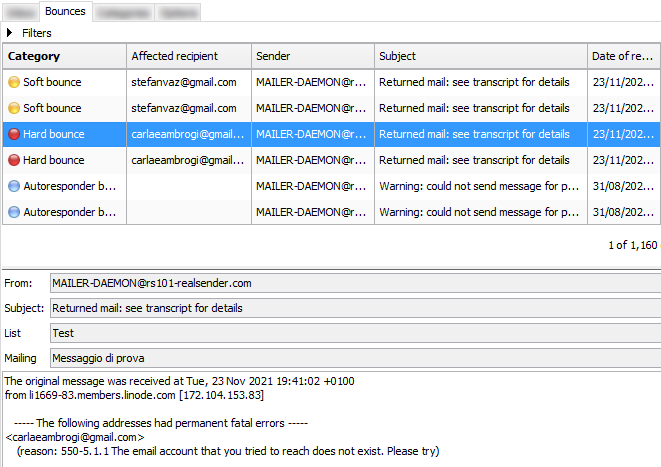
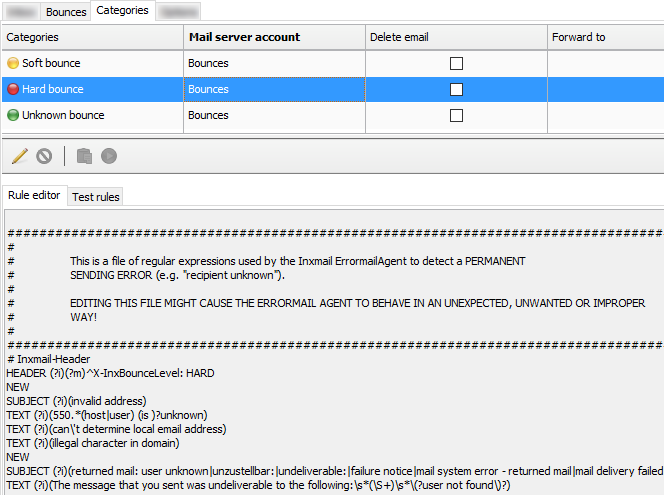
you should know how bounce handling works (and how to tweak it)
- all returned messages are downloaded by an application
they’re made available for human review, either through the app interface or through a JSON file
- the Classification follows some rules, which can be edited
- the Options define when soft bounces will be “upgraded” to to hard bounces level

» back to top
Check the number of bounces
Sometimes a configuration error on both the sender’s side and the recipient’s side
can cause a soft bounce or even a hard bounce.
A good habit is to check the number of bounced messages in the last week
to see if the values are the same as before or if there are any anomalies.
If there is something wrong, you will notice immediately.
Reading the details of the bounces will help you find the cause.
Some systems allow you to define the number of days (eg 180)
after which a subscriber’s bounce information is discarded.
In this way the smtp server will try to contact that recipient again.
Blocks activated by mistake will be cleared automatically
but the reputation of the smtp server can suffer.
» back to top
New trends for bounce handling
In one sentence: prevention is better than cure.
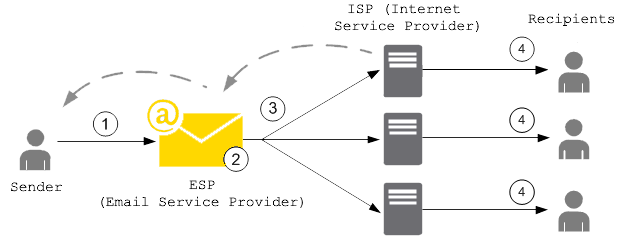
To avoid damage to the reputation of their SMTP servers,
more and more ESPs (Email Service Providers) use an “email suppression list”
that acts before the messages reach the recipient’s mailbox.
When any customer sends an email that results in a hard bounce,
the email address that produced the bounce is added to the suppression list.
The suppression list applies to all the customers. In other words,
if a different customer attempts to send an email to an address that’s on the suppression list,
the SMTP server won’t send it out, because the email address is suppressed.
Using smtp servers with dedicated IP can avoid some issues related to reputation sharing.
For example, the “email suppression list” can only be limited to your IP address,
so that if another customer causes a blacklisting of the smtp server and the related bounces,
your mailings will not be affected.
» back to top
Bounced messages status codes
Status codes used to identify hard bounces and soft bounces have the following syntax:
status-code = class “.” subject “.” detail
Status codes consist of three numeric fields separated by “.”
- the first sub-code (class) indicates whether the distribution attempt was successful
- the second sub-code (subject) indicates the probable source of any delivery anomaly
- the third sub-code (detail) indicates a specific error condition
The sub-code (class) provides a general classification of the status.
The values listed for each class are defined as follows in the RFC 3463 and the RFC 6522:
2.XXX.XXX Success (NOT sent unless requested by the sender)
Success specifies that the DSN is reporting a positive delivery action.
Detail sub-codes may provide notification of transformations required for delivery.

4.XXX.XXX Persistent Transient Failure
A persistent transient failure is one in which the message as sent is valid,
but persistence of some temporary condition has caused abandonment or delay of attempts to send the message.
If this code accompanies a delivery failure report, sending in the future may be successful.

5.XXX.XXX Permanent Failure
A permanent failure is one which is not likely to be resolved by resending the message in the current form.
Some change to the message or the destination must be made for successful delivery.
Some code and description examples:
2.0.0: Sent (Message accepted for delivery)

4.2.2: Over quota
4.4.5: Insufficient disk space

5.0.0: Invalid domain name
5.1.1: User unknown
5.7.1: Message content rejected
» back to top
how to check if my SMTP is safe
With the increasing number of ransomware attacks in the 2020s
email, our main communication channel on the Internet, is it safe?
The SMTP servers are a particularly sensitive infrastructure.
They can spread email messages on our behalf,
that our counterparts accept as coming from trusted senders
because they are correctly authenticated by the sending server.
SMTP servers are a particularly sensitive infrastructure.
They spread email messages on our behalf,
that our counterparts accept as coming from trusted senders
because they are properly authenticated by the sender’s SMTP server.
What happens if someone else uses your SMTP server?
How to check if my SMTP server is safe?
The use of sensitive infrastructures on the Internet
requires a high level of protection to prevent abuse.
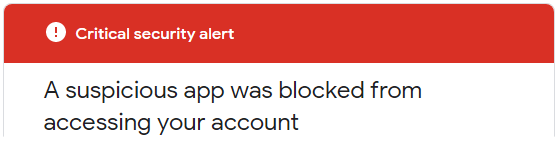
If you try to send messages via smtp.gmail.com
you’ll be blocked and receive this “Critical security alert”:
Less secure app blocked
Google blocked the app that you were trying to use
because it doesn't meet our security standards. [...]
The only alternative is to use OAuth2, a protocol that doesn’t share password data
but instead uses authorization tokens to prove identity.
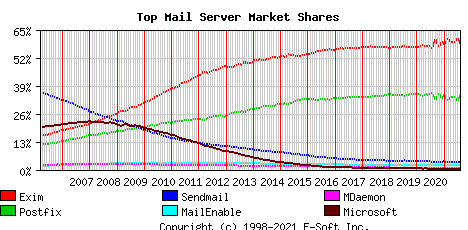
The most used mailservers on the Internet (August 2021 data) are:
Exim (58%), Postfix (35%), Sendmail (4%)
To continue using your own mailserver
reducing the risk of being hacked,
the minimum requirements to check are:
-
accept only secure authentication
username and password must be transmitted via secure connections,
typically port 587+TLS or port 25+TLS or port 465+SSL
plain text sensitive data communications are disabled
-
there must be a check on the “Mail-From” address (the sender),
only those you have authorized will be able to pass
-
configure Fail2ban to block all external attacks
to prevent attempts to force your protections.
In particular Fail2ban should block all repeated attempts:
- to log in with the wrong username or password
- to send emails with an unauthorized sender
- to interrupt the smtp connection during the authentication process
(multiple broken connections make the smtp service unavailable for legitimate users)
The block usually occurs between three and ten attempts
and bans the source IP for three to twenty-four hours.
It is quite easy to test these points and decide whether or not
your smtp infrastructure requires a security upgrade.
Fail2ban protects your server against BruteForce/DDOS attacks.
It works as if when a stranger knocks on the door,
after a certain number of strokes, the door disappears.

A testimony from Hacker News:
I manage my own mailserver since several years and I think many others here
use solutions like Mail-in-a-box, mailcow, Mailu, etc

Until Corona I never had big problems with my mailserver but in the last weeks
I got very big incoming Traffic - that was too much for my server and i had to manually reboot it every time ...

[...] Edit: I changed my fail2ban settings and found out I was primarily targeted
by brute force attacks which I should be able to protect against with tools like fail2ban
Fail2ban is a log-parsing application that monitors system logs
looking for the symptoms of an automated attack.
When an abuse attempt is located, using the defined parameters,
Fail2ban adds a new rule to the firewall (iptables or firewalld)
to block the IP address of the attacker, either for a set amount of time, or permanently.
Fail2ban can also alert you through email that an attack is occurring.
Fail2ban is primarily focused on SSH attacks, although it can be further configured
to work for any service that uses log files and can be subject to a compromise.
It is widely used. Searching for it on Google, it’s easy to find
configuration examples for protecting mail servers.
DNS settings to send emails
What domain DNS settings are required to send emails ?
Email service providers usually require you to verify the sender’s domain
before using their smtp servers. There are two reasons for this:
-
Prove domain ownership
by managing the DNS, you prove that you control the sender’s domain
this means you are not using someone else’s domain (spoofing)
-
Sending of authenticated emails
by setting SPF and DKIM authentication, your messages
are recognized by the recipients as coming from a “real” sender
if your domain and your smtp provider have a good reputation
the messages should reach the recipients’ inbox
Summary:
Email service providers: requirements for verified senders
Below there are some of the major providers we checked, in alphabetical order.
At the end of July 2021, we tested the basic settings required to start sending emails.
The verified domain was “emailperfect.com”. It was registred in 2012 and never used to send emails before.
| Provider name |
DKIM “From”
domain alignment |
SPF “Mail-From”
domain alignment |
Notes |
| Amazon SES |
yes (3 CNAME records) |
NO (@amazonses.com) |
|
| Mailgun |
yes (TXT record) |
yes (TXT record) |
Hotmail and Yahoo delivery check* |
| Mailjet |
yes (TXT record) |
NO (@mailjet.com) |
Hotmail and Yahoo delivery check* |
| RealSender |
yes (2 CNAME records) |
yes (TXT record) |
dedicated IP address |
| Sendgrid |
yes (2 CNAME records) |
yes (CNAME record) |
Hotmail delivery check* |
Sendinblue |
NO (sendinblue.com) |
NO (@aa.d.sender-sib.com) |
NO sender verification required |
| Smtp2go |
yes (1 CNAME record) |
yes (CNAME record) |
|
* = we sent a message to each of the following mailboxes and noted if anything suggested that we check again:
Gmail, Hotmail, Yahoo, Gmx, Aruba, Tiscali, Exchange Online
Why is a verified sender so important?
In 2021 we consider mandatory that the sender’s domain is authenticated
so that the recipient knows that the sender’s email address has not been forged.
Preemptive authentication checking also greatly reduces the risk of abuse of sending systems.
For this reason we have “deleted” a provider from the list:
It does not require the domain validation before allowing them to send messages.
What is domain alignment?
When sending a message, we are dealing with two domains:
- in the senders’s From address, that is visible to the recipients
- in the Mail-From address (also called “envelope sender” or “return-path”),
that is hidden and managed directly by the ESP to receive the bounced mails
The “domain alignment” requirement is summarized in this sentence:
“when a sender authenticates their email using SPF and/or DKIM,
at least one of the domains must align with the sending From domain”
CNAME record and TXT record, which one is best?
For DKIM authentication, a CNAME record is easier to implement.
The same result can be achieved by adding a 2048-bit TXT record but it is more complicated.
In addition, delegation of the DKIM record via CNAME allows your provider
to modify its key when necessary for security reasons.
For SPF authentication using a CNAME record means that the Mail-From address
will be a subdomain managed by your email service provider, such as: bounce.your-company-name.org.
The provider will handle both SPF authentication and bounced messages.
TXT record for SPF authentication is the best choice with email servers such as Zimbra or Exchange,
where each sender receives the bounced messages directly.
There is only one TXT record for domain authentication,
it may be difficult to maintain if you manage multiple smtp servers.
What is a dedicated IP address?
The “Internet Protocol address” or “IP address”
is similar to a telephone number on your home phone or mobile device.
Most SMTP services provide “shared” IP addresses to their customers.
Each time a mailing is sent, a different IP address is assigned.
“Dedicated IP address” means that your email sending IP address will not change over time.
This provides great control over the sender’s reputation that cannot be harmed by the use of others.
Should we manage the company’s domain DNS settings directly?
Not necessarily, because it requires some technical skills.
The company management should be aware that a few changes in the DNS settings
can lead to serious consequences such as:
- bring website visitors to another web server
- redirect incoming messages to a different mail server
- break email authentication so that messages are considered as spam or rejected
» back to top
how to manage MAILING LISTS
How to manage mailing lists with foresight ?
-
First of all: why use a mailing list manager?
CRM systems (such as Salesforce and Microsoft CRM)
and business emails (such as Office 365 and Google Apps Gmail)
they are not suitable for mass mailings.
They were created for one-to-one communication.
Often to avoid abuses they impose daily sending limits.
Many times companies have to send emails to most of their contacts or to some selected groups.
Bulk mailings must be managed with dedicated systems,
capable of processing large amounts of messages and automatic unsubscriptions.
-
Second step: where to look for these solutions?
The easy answer is to look at “Saas” - Software as a service - offers
(Mailchimp is the most famous system, Inxmail is less known, is used by large companies).
Local installation versus cloud services is always an important choice.
Our reflection is that the local option helps to “regain email control”, which we are promoting.
Even if you decide to use a self-hosted application in the cloud,
this allows you to easily change supplier while maintaining the same solution.
-
Three osolutions are worth mentioning:
- Sendy is mature but “closed source” and paid.
- Listmonk is open source. Version 1 was released in 2021. It has been developed in Go,
it comes as a standalone binary and the only dependency is a Postgres database. On GitHub it has 5.4k stars
- Mailtrain is open source too. The first version was first released in 2016, version 2 in 2021.
It uses a MySQL database. On GitHub it has 4.8k stars
In search of a clean interface, a list-centered solution, easy to maintain
and easy to restore in case of problems, we have considered listmonk as the best choice.
listmonk is a self-hosted, high performance mailing list and newsletter manager.
It comes as a standalone binary and the only dependency is a Postgres database.
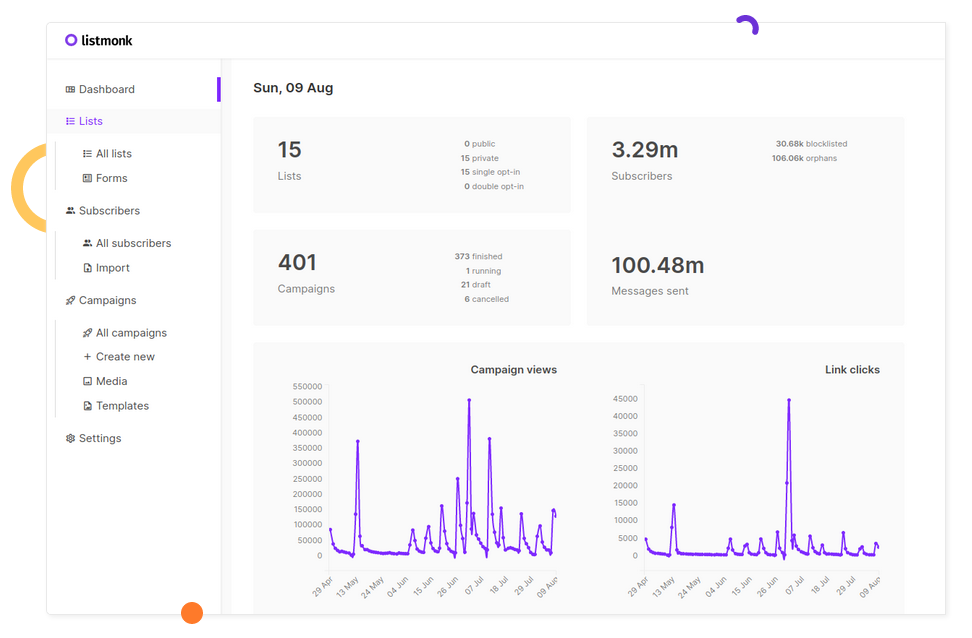
First steps of the application
This is the original announcement on Hacker News:
knadh on July 12, 2019 [–]

Author here. To give some context on why listmonk was built, at work (regulated financial business),
we have to deliver e-mails, mostly important updates, to 1.5mn+ customers regularly.
We used phpList for the longest time and then tried MailTrain and Sendy before finally deciding to reinvent the wheel
after running into a number of issues, of which, a few important ones are mentioned below.

- Performance. Unreasonably long amounts of time to send out e-mails.
  phpList degraded to the point of taking several days to process a campaign.
  listmonk can spawn N goroutines (~threads) and push e-mails to multiple SMTP servers.
  On a commodity ec2 instance, we're able to send 1.5mn+ e-mails in a couple hours.

- Subscriber imports were extremely slow. Direct integration to keep subscribers in sync with external CRMs was cumbersome.
  Direct DB inserts were complicated due to the complex table structures. listmonk imports 10k records/sec into a Postgres DB on a commodity ec2 instance.

- Segmentation. Often, we have to rapidly segment users by custom attributes and conditions and relay an update to them.
  listmonk supports SQL expressions to segment users on their attributes that are defined as arbitrary JSON maps (thanks to Postgres JSONB type).

- Unavailability of dynamic templates. listmonk templates support Go template expressions so it's possible to write logic in messages to make them dynamic.
Kailash Nadhis a very active developer in the FOSS (Free and Open Source Software) area.
He works at Zerodha, India’s largest stock broker.
The blog of Zerodha’s technical staff is published at zerodha.tech.
The details
Listmonk is well documented for standard use (via web interface) and developers (via api).
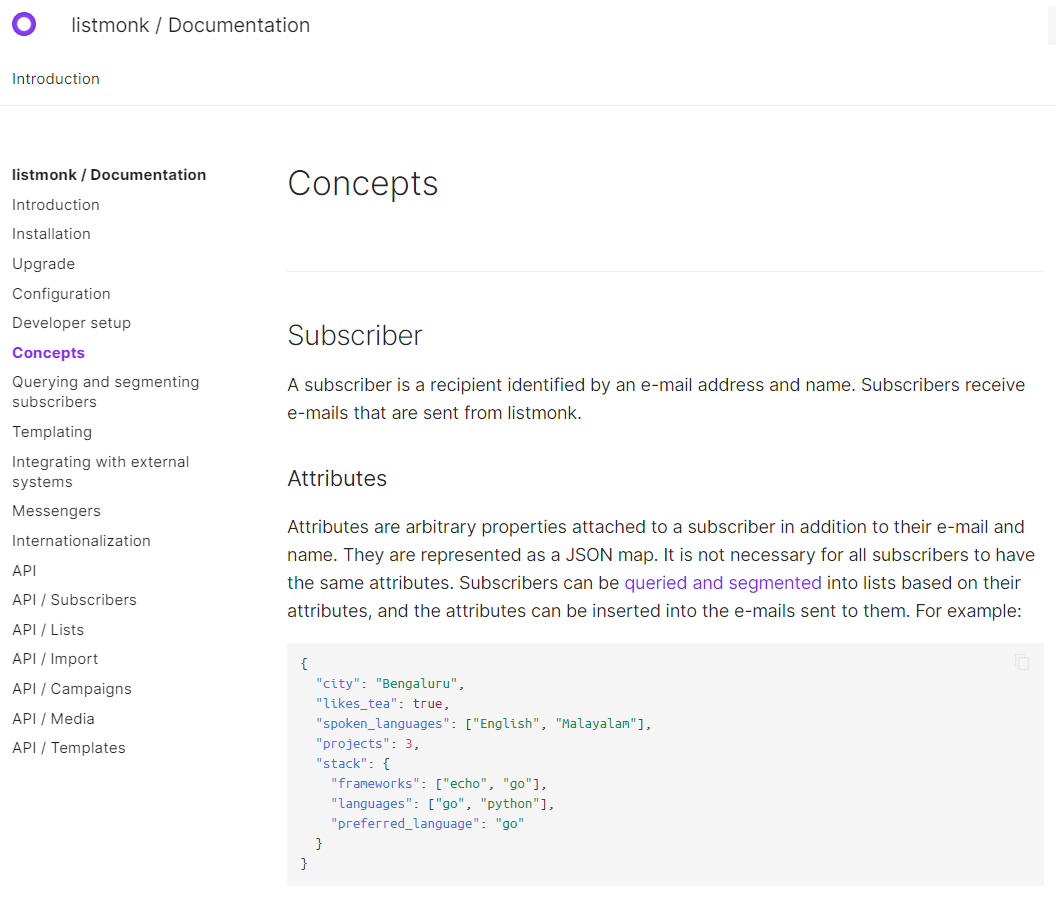
The solution is suitable for large lists (up to millions of subscribers) and also for small groups.
Thanks to the Querying and segmenting subscribers feature,
it lets you query and export a selection of subscribers based on their profiles and attributes.
The extracted data can be easily imported in a new targeted mailing list.
It lacks certain important features like email bounce handling.
But it should be available in the next major release:
Bounce processing #166
Bounce processing screenshot preview
Technical considerations
We used another Go application in the past: RealSender - DMARC REPORTS.
Source: dmarc-report-converter. It worked immediately with no hassle.
"PostgreSQL database management system with over two decades of development behind it,
is now the most advanced open-source database available anywhere."
-- A Brief History of PostgreSQL - https://www.postgresql.org/docs/9.3/history.html
We had a little experience of that when working in the past with Inxmail Professional server installation.
In 2017 Inxmail GmbH announced that they’ll support PostgreSQL only, dropping all the other DBs:
From 1 January 2019, we will focus on the optimal technical basis and discontinue support
for Windows servers as well as MySQL, Oracle and MS SQL Server databases.
This means that we will only offer support for Inxmail Professional based on Linux servers and PostgreSQL.
-- Inxmail Professional licence solution: Changes to our system support
   https://www.inxmail.de/files/files/de/downloads/Inxmail-Professional-licence-solution-EN.pdf
It is certainly a good choice and an investment in valuable knowledge for newbies.
Udemy online courses can help with the initial installation and maintenance of PostgreSQL.
Open source has risks: will a recent project, launched in 2019, be maintained in the future?
Nobody knows, maybe in the worst case some other developer will take care of it, but:
- it seems essential in its characteristics, if too complex it becomes difficult to maintain
- we submitted a bug report for listmonk and received a response from the developer within two hours
- the author works in a large company that uses it internally
Email deliverability
Email Deliverability, question and answer:
hemancuso on July 12, 2019 [–]
Projects like this seem like a great idea, but deliverability seems like a big concern
that is hard to measure unless you have a reasonable amount of experience.
What are best practices for using/selecting an ESP
if you were to use a project like this and want to ensure reasonable deliverability?

knadh on July 12, 2019 [–]
Author here. We've been using listmonk in production at our company (regulated financial business)
to deliver e-mail updates including regulatory ones for over 6 months.
We host our own SMTP instances using Postal on EC2 instances and have never had any issues with deliverability.
If it's legitimate e-mail, I don't think it's much of an issue.
We agree that sending expected communications to customers should help avoid most delivery issues.
In our experience, the larger the number, the more likely there will be drawbacks.
AWS EC2 servers are often blacklisted in Gmail - all sent messages are delivered to the Spam folder.
RealSender offers dedicated ip smtp servers,
that operate in a reliable and constantly monitored environment.
About the name

goberoi on July 13, 2019 [–]
Totally random question: how did you pick the name?

knadh on July 13, 2019 [–]
I can't quite recollect, but I think the thought process was along the lines of
"hassle free, peaceful list management".
Let’s try it
You can get a working demo installation in minutes using the docker image.
Alternatively ask RealSender a listmonk demo account.
» back to top
how to send NEWSLETTERS
After blacklisting, the customer support of a major anti-spam service often replies:
“please audit your list hygiene to ensure recipients interest in your mailings”.
“list hygiene” and “recipients interest” have many facets:
A - on the MACHINE side - “list hygiene”
-
well managed subscriptions and unsubscriptions
the subscriber must have validated her/his email address (double opt-in),
recipients should be able to easily and with certainty unsubscribe (opt-out)
-
send to “active” and fully engaged recipients only
do not repeatedly send to bad / mailbox full recipients
stop sending to inactive recipients, if they do not interact, is a clear signal of no interest
-
the content must be well paginated (not a single image) and “responsive”, so as to be readable on multiple devices
otherwise, spam filters may block the message before it reaches the recipient’s inbox
-
make sure the machines recognize who is sending
email authentication allows destination mailservers to identify messages as being sent by trusted senders
B - on the HUMAN side - “recipients interest”
-
subscribers should expect the content they receive
recipients should be looking forward to your message and appreciating it
-
user responses should be managed
sometimes something goes wrong or just some recipient needs to communicate with you,
maybe just to tell you that he doesn’t want to receive any more messages, even if there is an unsubscribe link
MACHINE side - “list hygiene”
The points listed above can be easily managed for small lists, with a few hundred recipients.
Often the sender knows them individually, because they are customers or members of an association.
Things get complicated when the list is larger, with thousands of recipients
and there are more people working on the mailings.
In this case it is mandatory to use professional tools.
On the internet there are many professional solutions for email marketing,
the best known internationally is MailChimp
many websites also list MailChimp alternatives.
EmailTrends’ mission is “to take back email control”,
for this reason we suggest an alternative way.
According to W3Techs, WordPress powers 40% of all the websites on the Internet
and it’s the most popular technology on the Entire Internet in Open Source category.


With over 200,000 active installations, Mailpoet
is one of the most used Wordpress plugin for newsletters.
MailPoet is open source software and from the end of 2020
is part of the companies connected to Automattic, the parent company of Wordpress.
Some screenshots may give you an idea of how the various points are met:
subscriptions and unsubscriptions
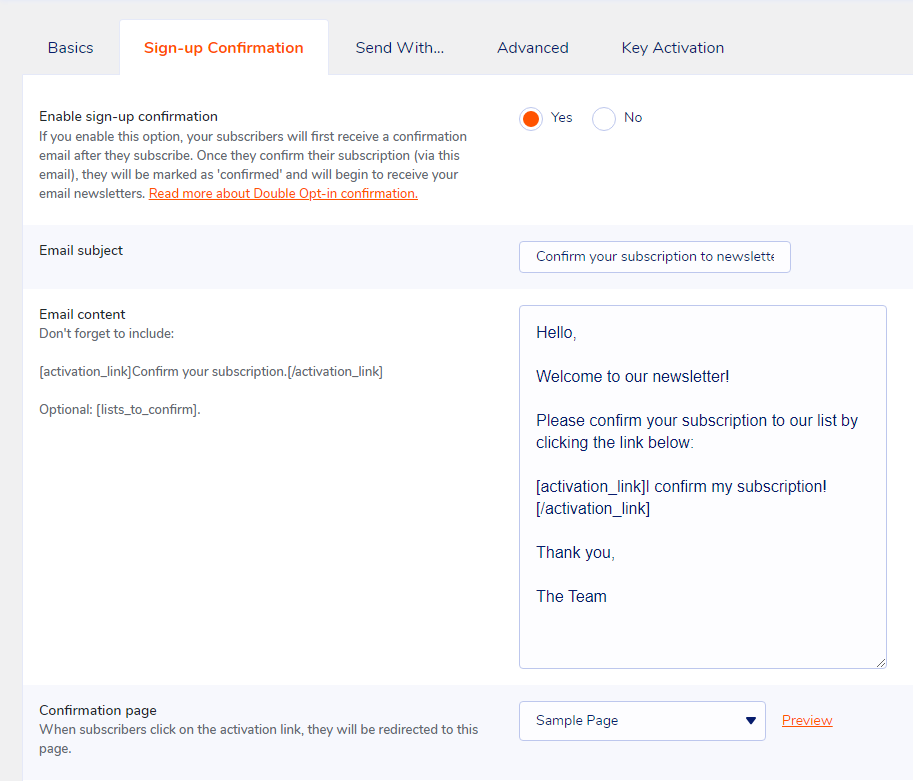
fully engaged recipients

change subscriber status to "Bounced"
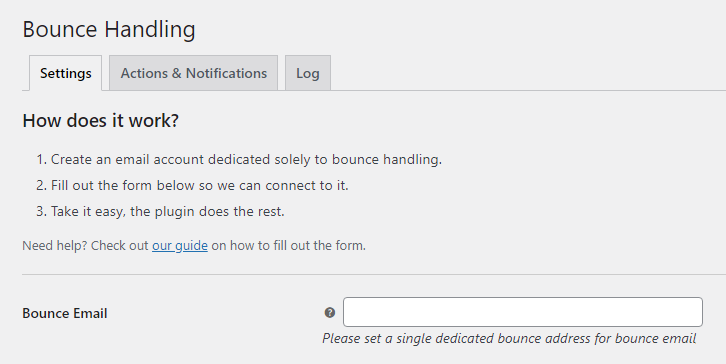
responsive email templates
Mailpoet has a “freemium” profit model, which allows you to choose the option:
“I just want the Premium with no sending”.
RealSender dedicated smtp server can be configured via the “Send With… > Other” option.
The “Bounce Handler MailPoet” plugin together with the newsletter mailboxes provided by RealSender
will guarantee the correct authentication of the email messages sent.
» back to top
HUMAN side - “recipients interest”
The human side is harder to achieve,
it is also the point that makes the difference
when the technical management is not perfect.

“BE RELEVANT”
is a slogan used a few years ago in email marketing.
When you send valuable information to people
you know deeply after talking to them for a long time,
it doesn’t matter how bad the formatting is
or if the message goes to the spam folder.
They will always forgive technical imperfections,
they’ll be waiting for your emails, read them
and click the “not spam” button if necessary.
» back to top
how to send PRIVATE EMAILS
How to send private and encrypted emails ?
Email is not private or secure.
It wasn’t designed with privacy or security in mind.
Anyone who handles your email in transit can read it,
including your ISP, a hacker, or the NSA (U.S. National Security Agency).
Summary:
what is happening today
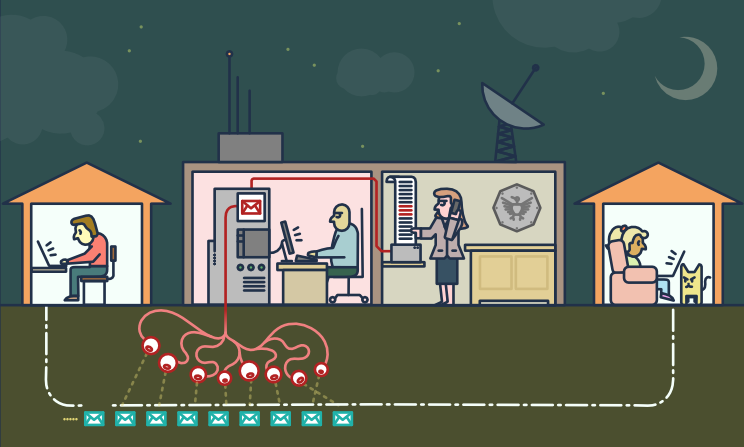
on the “legal” side
“The value of any piece of information is only known when you can connect it
with something else that arrives at a future point in time.
Since you can’t connect dots you don’t have, it drives us into a mode of,
we fundamentally try to collect everything and hang on to it forever.”
“They’ve said it’s just metadata, it’s just metadata, […]
who you’re talking to, when you’re talking to them, where you traveled.
These are all metadata events.
PRISM is about content. […] They can all see it because it’s unencrypted.”
There are dozens of psychological studies that prove
that when somebody knows that they might be watched,
the behavior they engage in is vastly more conformist and compliant.
[…] mass surveillance creates a prison in the mind […]
on the “illegal” side
Scammers might also use malware to infiltrate a company’s computer network
and access email exchanges about financial matters.
Business email compromise (BEC)—also known as email account compromise (EAC)
is one of the most financially damaging online crimes.
In a BEC scam, criminals send an email message that appears to come from a known source
making a legitimate request […]
back to top
the challenges
Anonymity and Confidentiality
Anonymity is different from confidentiality
[…] we’re encrypting messages
so that even if people see that we’ve sent a message
they can’t read what it is
but sometimes we don’t even want people to see that we sent a message at all
Internet anonymity is difficult to achieve.
It requires a deep knowledge of the tools you decide to use.
This guide might give you an idea of its complexity:
Private Email Providers
Confidentiality is easier to get.
Even if you have nothing to hide, using encryption
helps protect the privacy of people you communicate with
and makes life difficult for bulk surveillance systems.
If you do have something important to hide, you’re in good company;
these are the same tools that whistleblowers use to protect their identities
while shining light on human rights abuses, corruption and other crimes.
The essential first step is to protect yourself
and make surveillance of your communication as difficult as possible.
End-to-End Encryption
End-to-end (e2ee) encryption for email can be used to ensure
that only the sender and the recipients of a message can read the contents.
Without this protection it is easy for network administrators,
email providers and government agencies to read your messages.
Achieving e2ee requires carefulness by both the sender and the recipients.
A single mistake by any of the involved parties can be sufficient to break the security of e2ee.
Email metadata, such as sender email, recipient email, date and time, cannot be protected using e2ee.
The subject of the mail may also remain unprotected and easily readable, even when e2ee is used.
back to top
the solutions
< technical > Pretty Good Privacy - also known as PGP
PGP software follows the OpenPGP standard of encryption,
standard (RFC 4880) for encrypting and decrypting data.
PGP encrypts your email body into a code
that only the right person can read.
PGP runs on pretty much any computer or smartphone.
It’s freely licensed and costs no money.
Each user has a unique public key and private key,
which are random strings of numbers.
Your public key isn’t like a physical key, because it’s in an online directory, where people can download it.
People use your public key, along with PGP, to encrypt emails they send to you.
Your private key is more like a physical key, because you keep it to yourself (on your computer).
You use PGP and your private key to decode encrypted emails other people send to you.
If an email encrypted with PGP falls into the wrong hands, it’ll just look like nonsense.
Without the real recipient’s private key, it’s almost impossible to read it.
To protect ourselves form surveillance, we need to learn when to use PGP
and start sharing our public keys whenever we share email addresses.
< technical > How to use PGP encryption
To use PGP, you’ll need a public key and a private key (known together as a keypair).
Each is a long string of randomly generated numbers and letters that are unique to you.
Your public and private keys are linked together by a special mathematical function.
An application that manages the keys and the encryption/decryption of messages is required,
this is a selection of the most popular ones:
< easy > Alternatives to PGP encryption
PGP is the best solution for secure communications with a partner that is already using it.
Asking your counterpart to start using PGP could be hard.
The services that allow you to share a secret only once are an alternative.
When sending something a single time, there are open-source web apps
that allows you to enter information that can only be viewed once.
After the recipient has opened the page, the information is deleted,
and the only thing remaining in your chat logs or email is a bad link.
It’s not as robust as your entire team using PGP, but it’s much easier to set up or explain.
We’ve been able to use it to send login information to fairly non-technical people, and they find it easy to use.
Example (without adding a password):
Let's say you have a password. You want to give it to your coworker, Jane.
You could email it to her, but then it's in her email, which might be backed up,
and probably is in some storage device controlled by the NSA.

If Jane gets a link to the password and never looks at it, the password goes away.
If the NSA gets a hold of the link, and they look at the password... well they have the password.
Also, Jane can't get the password, but now Jane knows that not only is someone looking in her email,
they are clicking on links.
Some of these services, all free and opensource, are listed below.
You could also decide to host an instance on your own webserver.
PrivateBin (like a secure version of PasteBin) is developed in PHP
PrivateBin code is published on Github - 3100 stars
PrivateBin instructions are available on a different website
OneTimeSecret is developed in Ruby
OneTimeSecret code and instructions are published on Github - 1200 stars
SnapPass is written in Python. It was originally developed by Pinterest
SnapPass code and instructions are published on Github - 600 stars
back to top
how to send and limit BCC EMAILS
How to send and limit Bcc emails ?
“Cc” means “Carbon Copy” in the (old) sense of making a copy
on a typewriter using carbon paper.
The “Bcc:” field in emails (where the “Bcc” means “Blind Carbon Copy”)
contains addresses of recipients of the message
whose addresses are not to be revealed to other recipients of the message.
– IETF rfc 2822 “Internet Message Format”
The difference between Bcc and Cc lies in the privacy of the recipient.
Using the Cc feature, the email addresses in the Cc field
are visible to all the recipients of the email.
A Bcc recipient can see the direct recipient (To:),
he won’t be able to tell who else was Bcc’d in the email.
Bcc is often seen as an easy-to-use mass email distribution system.
Below is a brief analysis of the pros and cons of using Bcc.
At the end of the page, the conclusions with some suggestions.
PROS
It’s easy: anyone can use it.
- it’s an easy way to contact multiple email recipients
- anyone with an email client can utilize it
- when used correctly, it respects the recipients’ privacy by not disclosing their email IDs
back to top
CONS
Email is an outgoing gateway without prior checking.
Bcc increases its reach to hundreds or thousands of contacts.
Bcc should be considered a high risk,
potentially dangerous communication tool.
- it’s an error-prone process, the risks are:
- mistakenly add Bcc recipients in the Cc field
this usually causes severe brand damage
a new apology message is the most common way out of this situation
» the names of all the recipients are made public
» unintended (and sometimes intentional) use of “reply to all”
which generates uncontrolled email chains
» someone might raise a privacy incident from a GDPR perspective
if the subject/body contains “special categories” of personal data, thus identifying
the people that belong to the same category (i.e. illness, orientation or beliefs)
- mistakenly add someone as the main (visible) recipient
- forget to add someone or add someone that should not receive the message
- there is a high probability of being classified as spam
- the problem is, most spammers send using Bcc
the destination mailservers are cautious in accepting Bcc messages
- if I send you a message using Bcc,
you receive an email that is not addressed to you
that’s a mark against the message when it comes to evaluating spam
- the same message will be sent to “several” email addresses
belonging to the same domain all at once, it’s easy to count them and block it
- there is no control over wrong addresses
- there may be double/triple email addresses in the same recipient
this affects the sending to that recipient, even if one or more addresses are correct
- syntactically incorrect addresses are accepted without warning
for example, if the @ symbol is missing or there are spaces
- no personalization / low impact / little or no reactions
- the message will necessarily be standard and “anonymous”
no individual communication is possible, no Dear Mr./Mrs. …
- your Bcc’d recipients will receive a message directed to someone else
they are unlikely to pay attention or react to it
- it is very likely that there will be technical problems
- any abuse actions by spammers or hackers may quickly impact many recipients
compromising the reputation of the smtp server (i.e. server blacklisting)
- sender mailbox could be overrun by bounces (user unknown, mailbox full, …)
their number can vary between 5% and 20% of the emails that have been sent
- the sending may have a bad impact on email delivery systems (smtp servers), i.e.:
many “try again later” replies, large number of messages the mail-queue, system crash
back to top
CONCLUSIONS
- Set the Limits
- check the number of recipients allowed by your email provider
try it yourself, to be 100% sure
RealSender shares a list of 300 @bogusemail.net addresses for testing,
the messages will reach a “black-hole” mailserver:
bogusemail-test.txt
- limit the number of recipients in a single message to a small number, such as 20,
allowing more recipients, permits to easily send messages
to thousands of email addresses, just dividing them into small groups
- Go Professional
- allow massive emails through different channels only
- use a different From address when sending many messages
for example another subdomain, as @news.companyname.com
only authorized persons will have access to it
and they will handle it more carefully
- within structured offices, with many people working with email,
use dedicated apps to send mass mailings
the professional systems have an approval workflow
and step by step control, they are designed to avoid mistakes
back to top
measure EMAIL MARKETING
How to measure the performance of your email marketing campaigns?
The following information comes from our fifteen years of experience
with the Inxmail email marketing platform.
What are “email marketing campaigns”?
They are massive permission-based emails,
whose contents are generally customized according to the interests of the recipient,
where the sender can obtain feedback data based on the behavior of the recipients.
The answers or “feedback data” are the basis for the metrics
behind the reports on the performance of email marketing campaigns.
Let’s outline what they are and how they are measured:
The best technical tools are useless if the messages do not reach the recipient’s inbox.
This is where “email deliverability” comes into play:
email marketing campaigns
permission-based marketing
Permission-based marketing, also called “dialogue marketing”,
is a concept introduced by Seth Godin in 1999 in his best-seller “Permission marketing”.
In the book, it is defined as the opposite of “Interruption marketing”
generally used in traditional mass media such as TV and newspapers.
Aims to create a personal and direct communication,
a relationship between the two parties and activate a “human” dialogue
whose experience is useful and enriching for both.
back to top
tracking user reactions
Depending on the privacy permissions collected, the sender can record:
- aggregated data
- data of the single user (e.g. who opened the email, who clicked)
Aggregated data
they provide global feedback and information on general trends
(e.g. how many opened the email, how many clicked)
Single user data
they allow to obtain individual information
by collecting personal data and then sending personalized messages,
based on previous interactions and user behavior
back to top
how user tracking works
Link tracking is the activity to replacing the final URL of the website
with a fictitious address, which records the visit and redirects the user to the destination page.
Within email messages, only clicks on links can be tracked.
external images, those that the email client asks for confirmation before downloading,
are treated as links, so you just need to track an external image URL
to know the email opening rate.
Tracking usually only records the “mailid”,
a unique identifier of the mailing that has been sent.
Personalized tracking is achieved by adding to the visited pages
one or more parameters generated by the software,
such as: example.com/test.html?id=54725788327466628654
the “id” parameter refers to a specific user and a particular link in the message.
The information obtained can automatically
update the recipient’s data in the email marketing application
or pass the details on the origin of the click to the web analytics platform.
For example: a travel agency could measure
how many times the user clicks on sea or mountain news,
increasing a specific counter over time.
The data collected will indicate the recipient’s preferred destination.
back to top
how the open rate measurement works
Open rates are measured by combining data from clicks on tracked links
and “hidden clicks” generated by tracked images that have been downloaded.
If a message is opened in the email client preview,
without downloading the images or clicking on any links,
it is not possible to know that it has been opened.
Since 2003 initially Outlook, then most email clients,
to protect the privacy of their users
began to block the automatic download of images
which otherwise would have been tracked for each email read.
Since 2013, images in Gmail are displayed automatically by default.
The download is performed by a third server, called a “proxy”,
which masks the user’s terminal, but still allows the email marketing operators
to know that the image has been downloaded and the message opened.
Further information can be found here:
How the new Gmail image proxy works and what this means for you
Registration of opening rates is not accurate,
provides a lower value than actual openings.
It is a good idea to measure it anyway,
even just to compare the results of different campaigns.
back to top
email deliverability
seed emails
First of all it is necessary to check if the emails arrive in the mailboxes
of the main freemail domains present in your list
and also in the inbox of the two main suppliers of corporate mailboxes:
Google Apps and Office 365.
Content-activated spam filters are generally triggered by domains present in URLs (http …)
a good tip is to use only one domain in the links of your messages.
The domain should be the same one used in the sender address;
it is called “domain alignment” and reduces the risk related to phishing filters.
For the same reason, if links are tracked, they should use a subdomain
of the domain used in the sender address.
Real tests can be done simply by activating a “seed” mailbox for each email provider,
and then activate the forwarding of messages to your email address.
Send each mailbox a message with the subject “Test Message”
and the content “Test Message” plus the link to your domain.
If the message passes the spam filters, you should receive it in your inbox.
back to top
bounce rates
It is normal to receive bounced emails.
The reason may be the presence of abandoned addresses,
full mailboxes or other technical issues.
Depending on the “cleanliness” of your list,
the bounce rate can vary between 5% and 20%.
As the numbers grow, it becomes impossible to manually manage the bounced emails.
Email marketing applications integrate a feature called “bounce handler”
which automatically downloads rejected messages,
it analyzes and classifies them according to their content.
The destination email address is automatically disabled
after a number of “hard bounces”, persistent errors such as user unknown and host unreachable
or after a greater number of “soft bounces”, transient errors such as mailbox full.
It is important to monitor the “bounce rates” (rejected messages)
or the complementary “delivery rates” (messages accepted). Their sum will give 100%.
A change in their value is a symptom that should be investigated.
back to top
email marketing benchmarks
The biggest email marketing platforms publish benchmark numbers
that are based on the data collected by all their customers.
Technical terms used in the reports:
- Openings: number of recipients who have clicked
on at least one tracked link or opened at least one tracked image
- Open Rate: Openings / Number of recipients (net of bounces)
- Unique Clicks: number of recipients who have clicked on a link at least once
- Click Through Rate (CTR): Unique clicks / Number of recipients (net of bounces)
- Click To Open Rate (CTOR): Unique clicks / Openings
Here is a short list, most of them refer to the U.S.:
back to top
what is considered SPAM
What users and mail servers qualify as spam emails ?
Starting from our experience with RealSender,
we have tried to summarize the main points that could affect inbox delivery.
It is useless to evaluate the other points
if the messages are not expected/desired by their recipients.
USERS reactions
The sender should put himself in the recipient’s shoes, trying to figure out how an email message will be treated.
User complaints can lead to the blacklisting of the entire smtp server or of the domain name, affecting the delivery of all future messages.
- users generally* can manage their inbox: it is “spam” what every single user considers spam
* = many freemail providers DO NOT give the option to opt-out of their “internal advertising”
- the user expresses his choice by clicking the “Report Spam” button (within Gmail)
or the “Junk” button (within Outlook/Hotmail)
- the spam filters of modern mail servers are all connected to user complaints,
after a certain number of clicks on “Report as Spam”,
all messages with similar content will be delivered directly to the Spam folder
Basic technical settings are required to get email messages accepted.
IP address and IP class reputation
- smtp server IP blacklisting, you can find a lot of tools online googling for “blacklist check”
- smtp server IP class reputation, check our blog article for more information SMTP IP REPUTATION MATTERS
- if the messages are sent from a personal computer, the reputation of the public IP address of the Internet connection should also be checked
(some smtp server providers mask the IP address of the internet connection, so that the recipient’s system only sees their IP address)
correct smtp server SETUP
- reverse DNS
to make sure the IP address of your mail server points to the domain name that you use for sending mail
- the mail transfer agent, the application that routes and delivers email,
should be properly configured, following the latest RFC published by IETF
see for example: Making Postfix RFC Compliant
proper email AUTHENTICATION
Use email authentication methods, such as SPF and DKIM, to prove that your emails and your domain name belong together.
The nice side-effect is you help in preventing that your email domain is spoofed.
- SPF, a path-based email authentication protocol that allows email receivers to determine if the sender is authorized to use the domains in the message’s header by evaluating the IP address of the sender’s outbound MTA based on information published by the sender in DNS TXT records. SPF is defined in IETF RFC 4408.
- DKIM, an email authentication protocol that enables the sender to use public-key cryptography to sign outgoing emails in a manner that can be verified by the receiver. DKIM is defined in IETF RFC 4871. The DKIM standard is adopted by Gmail and other large corporations to completely eliminate phishing and spoofing from internet mail.
- DMARC, relies on the established SPF and DKIM standards for email authentication. Destination mail servers take action on unauthenticated mail, based on the sender “dmarc policy” and report on the outcome to the sender. DMARC is defined in the Internet Engineering Task Force’s published document RFC 7489.
SPAMASSASSIN check
- SpamAssassin is a server side software, used for email spam filtering. It uses a variety of spam-detection techniques.
Each test has a score value. The scores can be positive or negative, with positive values indicating “spam” and negative “ham” (non-spam).
The default score threshold for the recipient is “5.0”. If an email score lands higher than the threshold, is marked as spam.
It is so widely used that the score check before sending email messages should be considered mandatory.
- two online tools can help you to check your SpamAssassin score: isnotspam and mail-tester
- you have to send the message to the email address provided
- after a few seconds click the “view your report” or the “then check your score” buttons
The only surefire way to see if an email is classified as spam is to…
send it, and see how it shows up on the other side.
TRY and see what happens
- If you receive a bounced message, this can be of great help, because the last few lines usually describes the problem that caused the rejection.
If the explanation is incomprehensible, simply try sending a message with subject and content “Test message” and check if it is accepted.
In this case, you should send the same message several times, reducing the content gradually, until you identify which part activates the spam filter.
- Having a detailed sending log, can help you to verify if the messages are accepted of rejected
examples of information available in the log
- In some (rare) cases a sort of “whitelisting” is required.
Some spam system learns from what users do with the messages they receive.
If the individual recipient flags once the received mail as NON spam,
it will learn that they are valid messages and will begin delivering them in the “Inbox” folder instead of “Junk”.
Alternatively, the sender must be in the address book of the recipient or have previously exchanged emails with him.
open source EMAIL CLIENTS
How to regain email control using ready-to-run open source email clients ?
Over the past decade, we’ve seen an almost complete change in corporate mailboxes
from on-premises mail servers to cloud services like Exchange Online (Office 365) or Gmail for business (Google Apps).
The main reasons for it are:
- the need to access emails from mobile and web interfaces
- the need to protect mailboxes from spam and malware
In this way, the life of IT professionals has been simplified by offloading
the responsibility to manage the email infrastructure on the “big tech players”.
The risk of abandoning basic email skills, can lead us to think about email
as something that works magically, just because Microsoft and Google handle it.
We can regain email control by breaking down the messaging components and managing them individually:
- the incoming mailserver
- the email client
- the outgoing mailserver
This creates service isolation and segmentation and tremendously benefits security.
Thus, decreasing the attack surface through isolation/segmentation is considered best practice.
Furthermore, it increases the scalability and stability.
Email clients are the primary interface of mailboxes.
They’re a complex piece of software that interacts with users.
There are many solutions available on the market, we have selected them based on two requirements:
- multi-platform, actively managed and open source projects
- ready to use, so that system administrators can easily manage them
We came up with two choices:
-
 Mozilla Thunderbird is an open-source, cross-platform email client for personal computers. Developed by the Mozilla Foundation.
It supports both IMAP and POP (storing mail locally on your hard drive so that it can be accessed without an internet connection).
It features excellent mail filter capabilities and management.
Thunderbird has strong support for using multiple accounts and identities, including automated signature features.
It comes with ready-to-install versions for: Windows, Mac OS and Linux. To gain access remotely, users must first connect to their computer.
-
 The new Rainloop fork, is a simple, modern, lightweight & fast web-based email client.
It can handle large number of email accounts without the need of any database connectivity.
It holds both SMTP and IMAP protocols to easily send/receive emails without any trouble.
In 2020, the SnappyMail Github project has been published.
It is the drastically upgraded & secured fork of RainLoop Webmail Community edition.
Here is the SnappyMail email client demo. If you want to try the Admin interface, contact us.
work EMAIL and PRIVACY
Warning: this is a topic with strong legal implications.
Contact qualified consultants to verify the regulations and their application.
The work email is a business work tool
which contains an impressive amount of business-related information.
The companies can do whatever they want with the email,
which is a business work tool, but is it written and read by employees?
Can they read it? Can they backup it? Can they archive it?
Summary:
generic work email addresses, no constraints
The work mailbox has an ambivalent nature,
it is a tool owned by the employer, but is used by the employee.
We must distinguish between two different types of business email addresses:
- personal company mailbox, i.e. name.surname@companyname.com
- generic company mailbox such as info, support, sales, marketing, billing, etc.
that is, all those that are NOT related to a single person
The generic company mailboxes are not problematic at all,
the company checks them, reads all the messages, has no constraints.
personal company mailbox, such as company cars
The personal mailboxes, such as name.surname@companyname.com,
may contain personal data of the employee that the employer must protect.
If we choose to use this kind of mailbox,
as an employer we need to know which technical standards to adopt
and which tools to use to be able to process the data adequately.
The mailbox can be compared to the company car,
it is made available to the employee for use within the business tasks.
The employer for example can check the mileage, to verify that the employee
has not abused this work tool, using it for personal purposes.
The employer can not, however, monitor systematically and without specific reasons
what the employee does inside the company car.
The mailbox is the equivalent of the company car, a work tool that is owned by the company,
given to the employee to use it use it for work, just to carry out its tasks.
What the employee sends and receives, even during working hours, is like what happens
inside the cockpit of the company car and is equated to private correspondence.
back to top
read only under certain conditions
The company cannot read what is written in the email messages,
it cannot be done systematically and without a specific reason.
Even if there is a specific motivation, it can be done only under certain conditions.
Three different interests are at stake, which must be balanced:
- the employer’s interest in accessing this content
for organizational/production, work safety or other reasons
- the legitimate expectation of employees
who consider this content as confidential
- the expectation of third parties who write to that company name account
they may not be aware that the content of their correspondence is NOT private and confidential.
(the standard disclaimer at the bottom of email messages usually warns that the content may be read by others)
The employee must be informed, with adequate written communication, that the email messages
can only be used for all purposes related to the employment relationship, for example by prohibiting personal use.
The document must contain how to use the company tools,
including the email box, and inform that, in compliance with the privacy regulations:
- email messages will be archived to comply with the law and to protect company assets
- the company may, in some cases, carry out checks on the content of the employee’s mailbox
massive checks are prohibited
The so-called “massive controls” are prohibited,
such as the systematic reading of the contents of an employee’s mailbox.
Limits in employer control are based on three cardinal principles:
-
one is good faith, which is the possibility for the employer to carry out a check
on the employee’s company mailbox only if there is a well-founded reason
for example, for the protection of company assets that could be compromised or put at risk by a virus;
or in the case of suspected infidelity of the employee, to carry out defensive checks
-
the others are proportionality in the control and limitation in time and in the object of the research
back to top
obligation to archive email messages
The rules require that the employer must prove
to have adopted adequate and effective security measures
to protect company data, such as corporate email archiving.
Access to data by the employer
if carried out in the absence of detailed company information:
-
represents a very serious violation
sensitive data may be found in the employee’s personal space,
for example information about political, religious, sexual or trade union trends,
which must be guaranteed at the highest level of confidentiality
-
it is a criminal offense
there is also the risk for all illegally acquired data
to be unusable in any legal process
obligation to delete email messages
Business correspondence should generally be kept for a maximum of ten years.
To preserve the company’s assets and to be able to defend itself in any litigation situations.
The storage and processing of personal data is permitted only for a specific purpose.
If this purpose ceases to exist after a certain period of time, for example after ten years, this data must be deleted.
obligation to deactivate the mailboxes
In the event of employee dismissal or resignation,
the name.surname mailbox must be deactivated within a short period of time.
The company can activate an automatic reply informing the sender that the account has been deactivated,
inviting him to write to another internal email address.
The historical archive of company messages of terminated employees
can be kept only if the employee had been informed that his messages were stored.
back to top
protect emails from SPAM
How to protect business emails from spam ?
It is almost impossible to think about email without considering the issue of spam.
We tried to summarize the current situation and the strategies that can be followed:
How much email traffic is spam?
A reputable source is SenderBase, now called Talos,
showing about 85% spam email and 15% legitimate email
compared to the email traffic recorded in September 2020.
This percentage has been stable, with little changes in the last twelve months.
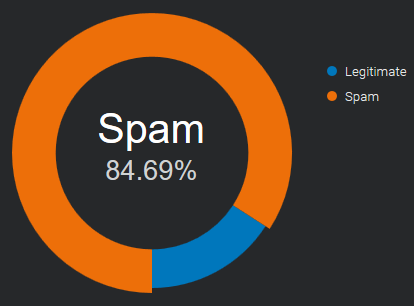
Source: Email & Spam Data - Total global email & spam volume.
back to top
What are the costs of spam?
Sometimes spam is just for promotional purposes, and the sender
is merely trying to generate more customers for his business,
causing distractions and loss of time. It can fill your inbox
so that it’s difficult to find emails that are important.
Not all spam are friendly promotional emails.
There are many cases where the intentions are malicious, aiming to damage or hijack user systems.
The most common variants of malicious spam worldwide include trojans, spyware, and ransomware.
back to top
What are the latest anti-spam techniques?
Imagine your company’s inboxes as your house door:
you have to decide who can come in and who you leave out.
No technique is a complete solution to the spam problem.
Each has trade-offs between incorrectly rejecting legitimate email (false positives)
as opposed to not rejecting of spam (false negatives)
and the associated costs in time, effort, and cost of wrongfully blocking good mail.
Anti-spam techniques can be broken into two areas: prevention and cure.
Spam prevention (before it happens)
Restrict the availability of your email addresses, with the goal of reducing the chance of receiving spam.
-
Discretion
don’t give your email address to everybody
the less known it is, the less spam you will receive
whenever it is possible, use a different email for online registrations
-
Contact forms
don’t publish your email address online
anybody can see it, “spambots” catch them all the time
to get contacted online, use secure* web forms / contact forms
* = protected by robots that fill them automatically
Spam cure (while it’s happening)
Once the spammers have your email address, the fight moves to your mail server and inbox.
-
SpamAssassin-like score systems
They use several spam-detection techniques including DNS based email blacklists
(commonly called Realtime blacklist, DNSBL or RBL), text analysis and Bayesian filtering.
Each test has a score value. The scores can be positive or negative, with positive values indicating “spam” and negative “ham” (non-spam).
The default score threshold for the recipient is “5.0”. If an email score lands higher than the threshold, is marked as spam.
There are a lot of “SpamAssassin Tests” available on the net,
that let the spammers check their messages before sending them.
-
Powered by users
Users of these systems can flag incoming emails as legitimate or spam and these notations are recorded into a central database.
After a certain number of users mark a particular email as junk, the filter automatically blocks it from reaching the rest of the community’s inboxes.
Sometimes users feedback is integrated with automated controls like the number of interactions with message contents,
as the amount of click on links and the images downloaded, or the count of the occurrences of the same message in multiple mailboxes.
When a collaborative content filtering system involves a large, active user base,
it can quickly block a spam outbreak, sometimes within a matter of minutes.
This kind of filter can hardly be overcome by spammers.
-
Email Authentication
SPF, DKIM and DMARC are authentication techniques that let you recognize if the from address is really who it claims to be.
In 2020 they’re widely used and they are a good source to identify the trusted senders.
It is important to know in advance the exact domain the emails are coming from,
otherwise it is easy to be misled by the simple change of a letter.
It’s possible for spammers to comply with email authentication
so that their messages look to come from “legitimate senders”.
-
Authorized senders, whitelist
In a whitelist one can specify a series of trusted addresses or domains.
In the beginning the personal address book and the past received emails will be of great help.
If a sender is in this list, all controls are skipped and the message is received without delays.
This method is easy to implement and very effective when associated with Email Authentication, to avoid email address spoofing*.
* = use of a fake sender to make the message appear from someone other than the actual source
Once your list of trusted contacts is filled, no unknown sender will reach your mailbox.
All unwanted messages can be redirected to a different mailbox to be checked once a day or more rarely.
Spammers will hardly find which are the trusted senders of each recipient.
Even when they do it, email authentication checks will alert you of the fraudulent use.
back to top
how DMARC works - updated
How dmarc works with Google Mail and Office 365 ? (updated)
We’ve tested again how email authentication affects the delivery
to Google Mail and Office 365 mailboxes, the most popular business emails providers.
The results can be divided into two groups:
emails delivery
(how spf, dkim and dmarc affect the delivery of sent messages)
# Google mail: the emails are always accepted, the spf authentication seems not to be considered at all
Dkim signature is evaluated only if it’s aligned with the From email address and dmarc is set with policy “quarantine” or “reject”.
# Office 365: is fully responsive to spf, when a message passes the spf check, it reaches the Inbox.
Dkim signature is considered only if it’s aligned with the From email address, otherwise it doesn’t matter.
Notes: in the last week of August Office 365 had a strange behavior:
only the messages signed with dkim (signing domain aligned with the From address)
and dmarc record set (with any policy), were delivered to the Inbox
spoofing protection
(how spf, dkim and dmarc protect the sender’s email address from being spoofed*)
* = make the message appear from someone other than the actual source
# Google mail: activating dmarc, the spoofed senders get filtered to the Spam folder (with p=quarantine) or rejected (with p=reject).
Nothing happens if the policy is set to “none” (p=none), in this case all the messages reach the Inbox.
# Office 365: “spf fail” or “spf softfail” results, are enough to send the fake senders to the Junk email folder.
authentication requirements
the suggested email authentication requirements, are summarized as follows:
|
emails delivery |
spoofing protection |
| Google Mail |
dkim pass (domain aligned) |
dmarc set with p=quarantine or p=reject |
| Office 365 |
spf pass and dkim pass (domain aligned) |
spf set and dmarc set (for added security) |
email delivery test results
below there is the full range of tests that have been made
|
|
Google Mail |
Google Mail
(dmarc set) |
Office 365 |
Office 365
(dmarc set) |
| spf Pass |
dkim none |
inbox |
inbox |
inbox |
inbox |
| spf Fail |
dkim none |
inbox |
spam |
junk |
junk |
| spf SoftFail |
dkim none |
inbox |
spam |
junk |
junk |
| spf none |
dkim none |
inbox |
spam |
junk |
junk |
|
|
|
|
|
|
| spf Pass |
dkim diff |
inbox |
inbox |
inbox |
inbox |
| spf Fail |
dkim diff |
inbox |
spam |
junk |
junk |
| spf SoftFail |
dkim diff |
inbox |
spam |
junk |
junk |
| spf none |
dkim diff |
inbox |
spam |
junk |
junk |
|
|
|
|
|
|
| spf Pass |
dkim pass |
inbox |
inbox |
inbox |
inbox |
| spf Fail |
dkim pass |
inbox |
inbox |
inbox |
inbox |
| spf SoftFail |
dkim pass |
inbox |
inbox |
inbox |
inbox |
| spf none |
dkim pass |
inbox |
inbox |
inbox |
inbox |
|
|
|
|
|
|
| spf Pass |
dkim invalid |
inbox |
inbox |
inbox |
inbox |
| spf Fail |
dkim invalid |
inbox |
spam |
junk |
junk |
| spf SoftFail |
dkim invalid |
inbox |
spam |
junk |
junk |
| spf none |
dkim invalid |
inbox |
spam |
junk |
junk |
Notes:
- the From address (visible sender) and the Mail-from (also said “envelope from” or “return-path”) are the same, they refer to the same domain
- “dkim pass”: the dkim signing domain is the same as the one of the From address (the domain is aligned)
- “dkim diff”: the dkim signing domain is different than the one of the From address (the domain IS NOT aligned)
DKIM domain for DMARC
How DKIM domain alignment affects DMARC authentication ?
DMARC (Domain-based Message Authentication, Reporting and Conformance),
is an email authentication standard, developed to combat spoofed domain mail.
In the chapter “3.1. Identifier Alignment” it says:
   Email authentication technologies authenticate various (and
   disparate) aspects of an individual message.  For example, [DKIM]
   authenticates the domain that affixed a signature to the message,
   while [SPF] can authenticate either the domain that appears in the
   RFC5321.MailFrom (Mail-From) portion of [SMTP] or the RFC5321.EHLO/
   HELO domain, or both.  These may be different domains, and they are
   typically not visible to the end user.

   DMARC authenticates use of the RFC5322.From domain by requiring that
   it match (be aligned with) an Authenticated Identifier.

   -- https://tools.ietf.org/html/rfc7489#section-3.1
It simply means:
   when a sender authenticates their email using SPF and/or DKIM,
   at least one of the domains must align with the sending From domain
It was not clear to us if a message could fail SPF or DKIM check
and still pass the DMARC authentication.
We tested it using a tool available to everyone: a Gmail mailbox.
To see the outcome, open the message and select “Show original”:
Test 1 - forwarded message: spf-fail, dkim-pass (aligned)
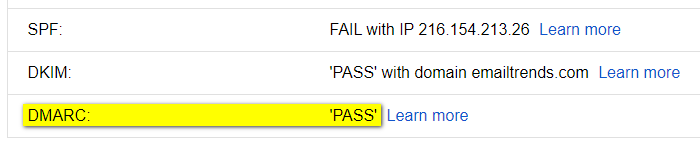
Test 2 - broken dkim key: dkim-fail, spf-pass (aligned)
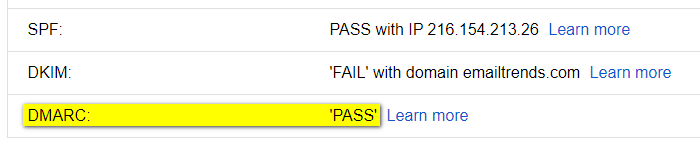
The result is evident, the message passes DMARC authentication if it occurs:
SPF and domain alignment <OR> DKIM and domain alignment
To pass the DMARC check, in some cases it is therefore important to validate the DKIM signature:
the signing domain (d=example.com) must be aligned with the From domain.
Examples of “DMARC-PASS” results that otherwise would not have worked:
Case 1 - forwarding breaks the SPF authentication
-
SPF-FAIL: SPF Authentication checks will mostly fail,
because a new entity, not included in the original sender’s SPF Record, sends the forwarded email
-
DKIM-PASS (aligned): Email forwarding does not affect the DKIM signature
Result: DKIM alignment allows the message to pass the DMARC check.
Case 2 - the SPF domain provided by the ESP (Email Service Provider)
CANNOT be aligned with the From domain
-
SPF~PASS (NOT aligned): SPF Authentication fails domain alignment,
since the domain used by the ESP within the Mail-From address is different by the one in the From sender
-
DKIM-PASS (aligned): DKIM signature uses the same domain of the From sender
Result: DKIM alignment allows the message to pass the DMARC check.
most popular EMAIL PROVIDERS
Which are the most popular email providers in 2020 ?
To monitor email deliverability, it is important to know which email providers your recipients are using.
Busines to Business
For B2B world we don’t have precise numbers. The most part of business mailboxes are moving to “Cloud Office Suites”, where the market is divided among “G Suite” and “Office 365”.
Together they cover more than 90% of global business email market share, according to datanyze.com data.
Gathering this information for a single business is quite easy.
From the mx record of the company domain, we can see the email provider being used:
aspmx.l.google.com for “G Suite”
mail.protection.outlook.com for “Office 365”
If your company works in B2B, it is recommended that you regularly monitor a mailbox for each of these two providers.
A third player is Zoho (mx.zoho.com), its market share is around 2% (source: ciodive.com).
Busines to Consumer
With B2C the analysis is more complex. There are no public “email open data” based on the internet traffic.
The only way to get information on email recipients is to extract them from our contact list or to get them by big email service providers. Some of them produce yearly reports to share them with the internet community.
The data below show the top three email providers in twenty-five countries, the information comes from the “2019 Email Benchmark and Engagement Study” published by Sendgrid.
Countries
Argentina, Australia, Belgium, Brazil, Canada, Chile, China, Colombia, Denmark, France, Germany, India, Indonesia, Italy, Japan, Mexico, New Zealand, Russia, Saudi Arabia, Spain, South Africa, Sweden, Switzerland, United Kingdom, United States
Argentina
| ISO |
Provider #1 |
% |
Provider #2 |
% |
Provider #3 |
% |
|
Total |
| AR |
gmail.com |
45.8% |
hotmail.com |
33.7% |
yahoo.com.ar |
8.2% |
|
87.7% |
back to top
Australia
| ISO |
Provider #1 |
% |
Provider #2 |
% |
Provider #3 |
% |
|
Total |
| AU |
gmail.com |
38.0% |
hotmail.com |
18.7% |
bigpond.com |
5.4% |
|
62.1% |
back to top
Belgium
| ISO |
Provider #1 |
% |
Provider #2 |
% |
Provider #3 |
% |
|
Total |
| BE |
gmail.com |
30.6% |
hotmail.com |
23.0% |
telenet.be |
9.8% |
|
63.4% |
back to top
Brazil
| ISO |
Provider #1 |
% |
Provider #2 |
% |
Provider #3 |
% |
|
Total |
| BR |
gmail.com |
52.9% |
hotmail.com |
22.5% |
yahoo.com.br |
6.1% |
|
81.5% |
back to top
Canada
| ISO |
Provider #1 |
% |
Provider #2 |
% |
Provider #3 |
% |
|
Total |
| CA |
gmail.com |
38.6% |
hotmail.com |
18.8% |
yahoo.com |
4.5% |
|
61.9% |
back to top
Chile
| ISO |
Provider #1 |
% |
Provider #2 |
% |
Provider #3 |
% |
|
Total |
| CL |
gmail.com |
67.3% |
hotmail.com |
18.2% |
yahoo.es |
1.7% |
|
87.2% |
back to top
China
| ISO |
Provider #1 |
% |
Provider #2 |
% |
Provider #3 |
% |
|
Total |
| CN |
NetEase (126.com 163.com) |
n.a. |
Tencent (qq.com) |
n.a. |
Sina (sina.com) |
n.a. |
|
n.a. |
Note: information taken from “Country overview: China” by ReturnPath
back to top
Colombia
| ISO |
Provider #1 |
% |
Provider #2 |
% |
Provider #3 |
% |
|
Total |
| CO |
gmail.com |
41.3% |
hotmail.com |
38.7% |
yahoo.com |
4.3% |
|
84.3% |
back to top
Denmark
| ISO |
Provider #1 |
% |
Provider #2 |
% |
Provider #3 |
% |
|
Total |
| DK |
gmail.com |
35.8% |
hotmail.com |
14.0% |
live.dk |
3.7% |
|
53.5% |
back to top
France
| ISO |
Provider #1 |
% |
Provider #2 |
% |
Provider #3 |
% |
|
Total |
| FR |
gmail.com |
36.0% |
hotmail.fr |
9.8% |
orange.fr |
8.2% |
|
54.0% |
back to top
Germany
| ISO |
Provider #1 |
% |
Provider #2 |
% |
Provider #3 |
% |
|
Total |
| DE |
gmail.com |
20.8% |
gmx.de |
10.0% |
web.de |
9.5% |
|
40.3% |
back to top
India
| ISO |
Provider #1 |
% |
Provider #2 |
% |
Provider #3 |
% |
|
Total |
| IN |
gmail.com |
82.4% |
yahoo.com |
3.4% |
yahoo.co.in |
1.6% |
|
87.4% |
back to top
Indonesia
| ISO |
Provider #1 |
% |
Provider #2 |
% |
Provider #3 |
% |
|
Total |
| ID |
gmail.com |
82.6% |
yahoo.com |
7.1% |
yahoo.co.id |
1.0% |
|
90.7% |
back to top
Italy
| ISO |
Provider #1 |
% |
Provider #2 |
% |
Provider #3 |
% |
|
Total |
| IT |
gmail.com |
46.8% |
libero.it |
9.9% |
hotmail.it |
7.2% |
|
63.9% |
back to top
Japan
| ISO |
Provider #1 |
% |
Provider #2 |
% |
Provider #3 |
% |
|
Total |
| JP |
gmail.com |
33.8% |
yahoo.co.jp |
12.7% |
docomo.ne.jp |
8.6% |
|
55.1% |
back to top
Mexico
| ISO |
Provider #1 |
% |
Provider #2 |
% |
Provider #3 |
% |
|
Total |
| MX |
gmail.com |
42.6% |
hotmail.com |
31.5% |
yahoo.com.mx |
4.0% |
|
78.1% |
back to top
Netherlands
| ISO |
Provider #1 |
% |
Provider #2 |
% |
Provider #3 |
% |
|
Total |
| NL |
gmail.com |
35.4% |
hotmail.com |
19.5% |
live.nl |
2.5% |
|
57.4% |
back to top
New Zealand
| ISO |
Provider #1 |
% |
Provider #2 |
% |
Provider #3 |
% |
|
Total |
| NZ |
gmail.com |
46.3% |
hotmail.com |
10.9% |
xtra.co.nz |
9.0% |
|
66.2% |
back to top
Russia
| ISO |
Provider #1 |
% |
Provider #2 |
% |
Provider #3 |
% |
|
Total |
| RU |
mail.ru |
34.8% |
gmail.com |
22.7% |
yandex.ru |
19.6% |
|
77.1% |
back to top
Saudi Arabia
| ISO |
Provider #1 |
% |
Provider #2 |
% |
Provider #3 |
% |
|
Total |
| SA |
gmail.com |
47.0% |
hotmail.com |
31.0% |
yahoo.com |
7.8% |
|
85.8% |
back to top
Spain
| ISO |
Provider #1 |
% |
Provider #2 |
% |
Provider #3 |
% |
|
Total |
| ES |
gmail.com |
50.2% |
hotmail.com |
25.8% |
yahoo.es |
3.8% |
|
79.8% |
back to top
South Africa
| ISO |
Provider #1 |
% |
Provider #2 |
% |
Provider #3 |
% |
|
Total |
| ZA |
gmail.com |
65.5% |
yahoo.com |
4.1% |
hotmail.com |
2.9% |
|
72.5% |
back to top
Sweden
| ISO |
Provider #1 |
% |
Provider #2 |
% |
Provider #3 |
% |
|
Total |
| SE |
gmail.com |
33.2% |
hotmail.com |
21.0% |
live.se |
3.0% |
|
57.2% |
back to top
Switzerland
| ISO |
Provider #1 |
% |
Provider #2 |
% |
Provider #3 |
% |
|
Total |
| CH |
gmail.com |
25.5% |
bluewin.ch |
14.6% |
hotmail.com |
10.5% |
|
50.6% |
back to top
United Kingdom
| ISO |
Provider #1 |
% |
Provider #2 |
% |
Provider #3 |
% |
|
Total |
| UK |
gmail.com |
30.8% |
hotmail.com |
10.4% |
hotmail.co.uk |
9.2% |
|
50.4% |
back to top
United States
| ISO |
Provider #1 |
% |
Provider #2 |
% |
Provider #3 |
% |
|
Total |
| US |
gmail.com |
41.9% |
yahoo.com |
15.1% |
hotmail.com |
5.3% |
|
62.3% |
back to top
how DMARC works
How dmarc works with Google Mail and Office 365 in 2020 ?
We’ve tested how email authentication affects the delivery
to Google Mail and Office 365, the most popular business emails providers.
The results can be divided into two groups:
-
emails delivery
(how spf, dkim and dmarc affect the delivery of sent messages)
Google mail: the emails are always accepted, authentication seems not to be considered at all
Office 365: is generally responsive to spf and dkim. The only way to get consistent results, reaching the inbox, is to associate them with dmarc
-
spoofing protection
(how spf, dkim and dmarc protect the sender’s email address from being spoofed*)
* = make the message appear from someone other than the actual source
Google mail: combining dmarc and spf (fail or softfail qualifiers), the spoofed senders get filtered to the Spam folder or rejected (depending on your dmarc settings)
Office 365: spf (fail or softfail qualifiers) is enough to send fake senders to the Junk email folder
They are summarized as follows:
|
emails delivery |
spoofing protection |
| Google Mail |
always accepted, authentication is not considered at all |
dmarc + spf (fail or softfail) |
| Office 365 |
dmarc + spf pass or dmarc + dkim pass |
spf (fail or softfail) |
Below there is the full range of tests that have been made.
|
Google Mail |
Office 365 |
| spf Pass - dkim none |
inbox |
inbox |
| spf Fail - dkim none |
inbox |
junk |
| spf SoftFail - dkim none |
inbox |
junk |
| spf Neutral - dkim none |
inbox |
inbox |
| spf none - dkim none |
inbox |
junk |
|
|
|
| spf Pass - dkim pass |
inbox |
junk* |
| spf Fail - dkim pass |
inbox |
junk |
| spf SoftFail - dkim pass |
inbox |
junk* |
| spf Neutral - dkim pass |
inbox |
junk* |
| spf none - dkim pass |
inbox |
junk* |
|
|
|
| spf Pass - dkim invalid |
inbox |
junk |
| spf Fail - dkim invalid |
inbox |
junk |
| spf SoftFail - dkim invalid |
inbox |
junk |
| spf Neutral - dkim invalid |
inbox |
junk |
| spf none - dkim invalid |
inbox |
junk |
|
|
|
| spf Pass - dkim invalid - dmarc reject |
inbox |
inbox |
| spf Fail - dkim invalid - dmarc reject |
dsn=5.0.0, stat=Service unavailable |
junk |
| spf SoftFail - dkim invalid - dmarc reject |
dsn=5.0.0, stat=Service unavailable |
junk |
| spf Neutral - dkim invalid - dmarc reject |
inbox |
inbox |
| spf none - dkim invalid - dmarc reject |
dsn=5.0.0, stat=Service unavailable |
junk |
|
|
|
| spf Pass - dkim pass - dmarc reject |
inbox |
inbox |
| spf Fail - dkim pass - dmarc reject |
inbox |
inbox |
| spf SoftFail - dkim pass - dmarc reject |
inbox |
inbox |
| spf Neutral - dkim pass - dmarc reject |
inbox |
inbox |
| spf none - dkim pass - dmarc reject |
inbox |
inbox |
|
|
|
| spf Pass - dkim diff - dmarc reject |
inbox |
inbox |
| spf Fail - dkim diff - dmarc reject |
dsn=5.0.0, stat=Service unavailable |
junk |
| spf SoftFail - dkim diff - dmarc reject |
dsn=5.0.0, stat=Service unavailable |
junk |
| spf Neutral - dkim diff - dmarc reject |
inbox |
inbox |
| spf none - dkim diff - dmarc reject |
dsn=5.0.0, stat=Service unavailable |
junk |
Notes:
- the from address (visible sender) and the envelope from (return-path) are from the same domain
- “dkim pass”: the dkim signing domain is the same as the one of the from address
- “dkim diff”: the dkim signing domain is different than the one of the from address
- the asterisks in the second group means that the results have not been consistent over time